
Check-In Station Math for Conferences With 100+ Exhibitors
A step-by-step formula for sizing check-in stations and staff at 1,000-5,000 attendee conferences with a large exhibitor floor, including badge pickup.
September 3, 2026
Check-in for a conference with 1,000+ attendees and a large exhibitor floor is a different planning problem than check-in for a similarly sized conference without one, because exhibitor staff badge pickup adds a second wave of volume that collides with general attendee arrival if it is not planned for separately. This guide walks through the station-and-staffing formula, the exhibitor-specific planning decisions, and the failure modes specific to running check-in at this scale. For check-in fundamentals that apply at any conference size, see our general guide to speeding up conference check-in; this guide picks up where that one leaves off, for the specific case of a large conference with a big exhibitor floor.
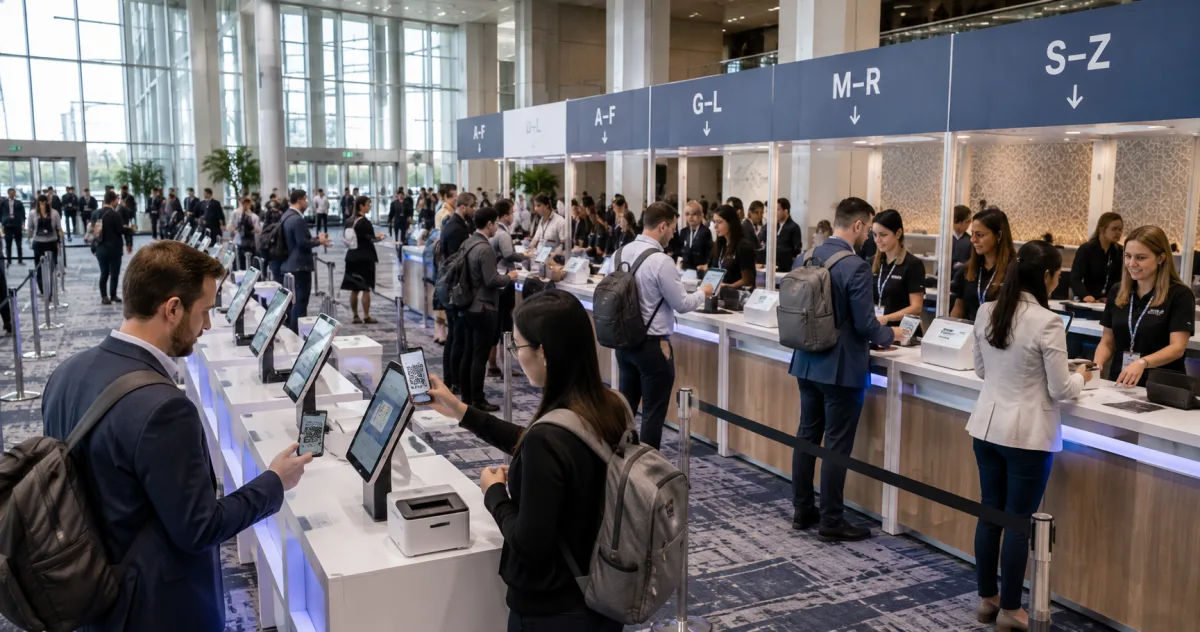
Why Exhibitor-Heavy Conferences Need a Different Check-In Plan
At small events, check-in problems are usually forgiving. A slow transaction or an understaffed table costs a few minutes and nobody outside the first ten people notices. At 1,000+ attendees with a large exhibitor floor, the same mistakes compound because so many people are trying to move through the same physical space in the same narrow window, and exhibit staff badge pickup adds a second arrival wave that a general check-in plan does not account for.
Four causes show up in nearly every large-conference check-in backup:
Single-line queuing. Even with five check-in stations, if attendees form one line that feeds all five, the line moves at the pace of the slowest transaction, not the average one. A confused attendee, a badge that will not scan, or a name that cannot be found stalls everyone behind them instead of only the people at that one station.
Manual lookups. Typing a name into a search field, scrolling a spreadsheet, or flipping through an alphabetical printout takes 45 to 90 seconds per person. At a 2,000-person event with 60% of attendees arriving in the first hour, manual lookup alone can consume the entire check-in window before the keynote starts.
Paper-only badges printed on the spot. Printing each badge as the attendee stands at the table adds 15 to 30 seconds per transaction under good conditions, more if a printer jams or runs low on ribbon. Multiply that delay across a thousand transactions and the line grows for hours, not minutes.
Mismatched staff-to-attendee ratios. Organizers frequently staff check-in based on total headcount for the day rather than peak arrival volume in the first hour. A team that looks adequately staffed on paper can still be overwhelmed if 70% of attendees show up in a 45-minute window.
None of these causes are unique to large events. What is unique is how quickly they compound once volume crosses roughly 1,000 attendees, which is why the fixes below are framed around scale-specific math rather than general check-in tips. For the fundamentals of check-in process design at any size, see our guide to speeding up conference check-in.
What Changes at 1,000+ Attendees
Below about 500 attendees, a well-run staffed desk can absorb almost any process mistake. Above 1,000, especially at events that also run a large exhibit hall opening at the same time as general session doors, three things change:
The margin for error shrinks. A 90-second lookup time is annoying at 300 attendees. At 2,000 attendees with 60% arriving in an hour, that same lookup time means your line never actually clears before the keynote starts, because new arrivals are joining faster than the line is processing.
Exhibitor and staff badge pickup adds parallel volume. Large conferences with 50 to 100+ exhibitors typically also need to badge exhibit staff, often on the same morning, sometimes at a separate but nearby desk. If that volume is not planned for separately, exhibitor badge pickup collides with attendee check-in and both slow down.
Physical space becomes a constraint, not just a nice-to-have. A line that would be a minor inconvenience at a 200-person meeting can become a fire code or crowd-safety issue at 2,000+ people if it backs into a hallway, stairwell, or public street. Large-venue check-in design has to account for queue containment, not just throughput.
The practical implication: at this scale, you cannot staff your way out of a bad process. You need a throughput calculation, a station plan built around your actual peak (not your daily average), and a badge strategy that removes as many manual steps as possible before doors open.
Station and Staffing Math: A Step-by-Step Formula
Use this sequence to size your check-in operation instead of guessing at a "feels right" number of tables.
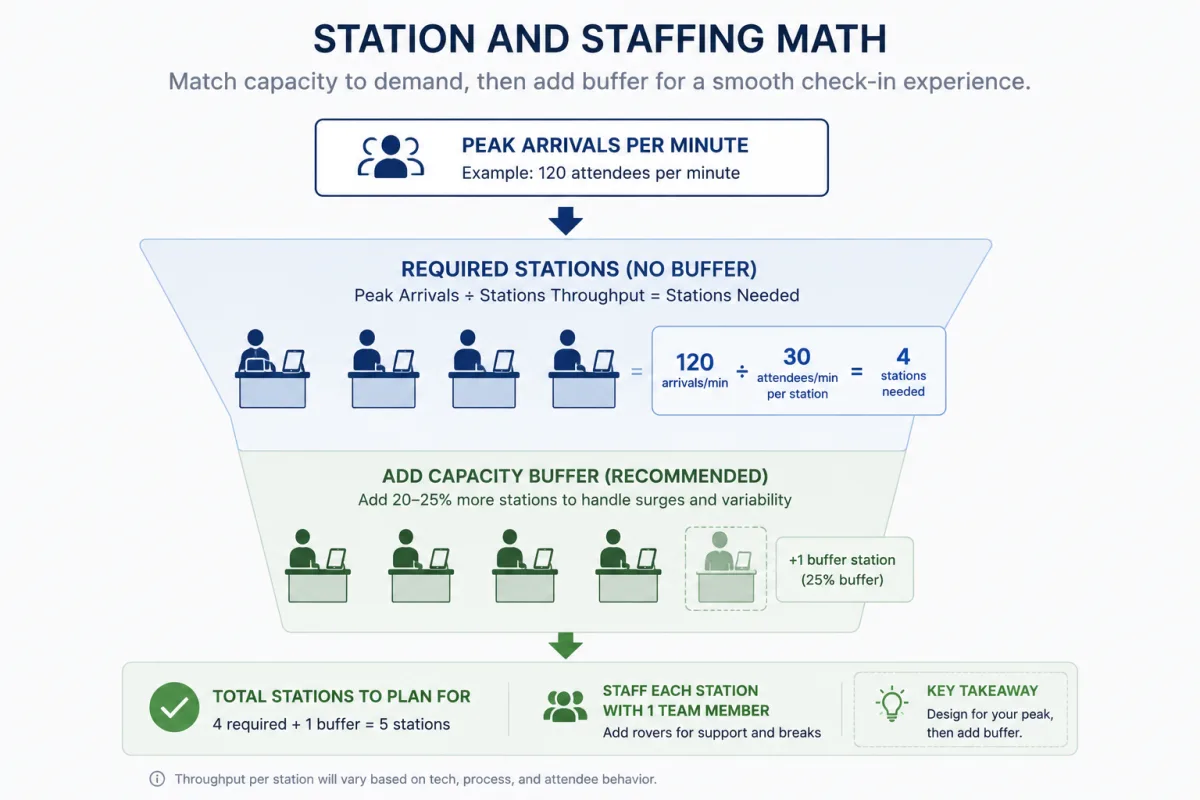
Step 1: Estimate your peak arrival window. Industry experience across conferences and trade shows consistently shows a large share of attendees arriving in a compressed window before the first keynote or the exhibit hall opening, commonly 50 to 70% of total attendance in the 45 to 60 minutes before doors are scheduled to open. If you have historical data from a past event, use it. If not, plan around 60% of total attendees arriving in a 60-minute peak window as a conservative planning assumption.
Step 2: Convert peak volume into a per-minute number. If you expect 2,800 attendees and assume 60% arrive in a 60-minute window, that is 1,680 people in 60 minutes, or 28 people per minute at peak.
Step 3: Estimate per-station throughput based on your process. Realistic ranges, based on typical transaction times:
- Pre-printed badge pickup with a QR scan confirmation: roughly 3 to 4 people per minute per station
- Self-serve kiosk with QR scan and instant badge print: roughly 4 to 6 people per minute per station
- Manual name lookup with on-demand printing: roughly 1 to 1.3 people per minute per station
Step 4: Divide peak-minute volume by per-station throughput. At 28 people per minute needed and 4 people per minute per station (a pre-printed badge pickup process), you need 7 stations running at full capacity just to keep pace with the theoretical peak.
Step 5: Add a buffer. Real check-in operations never run at 100% theoretical efficiency. Attendees fumble for phones, ask questions, or need a name corrected. Add 25 to 30% capacity buffer on top of the theoretical minimum. In the example above, 7 stations becomes 9 to reliably absorb peak load without a line building.
Step 6: Size your staffing separately from your stations. Station operators are only part of the labor picture. Plan for one floating staff member (directing traffic, watching for backups, redeploying help) per roughly 3 to 4 stations, plus a dedicated exception desk staffed by your most experienced person. A commonly cited planning ratio for total on-site check-in staffing, including floaters and exception handling, is 1 staff member per 150 to 250 total attendees, in addition to station operators.
This formula is deliberately conservative. If your actual transaction times are faster (say, because you have tested your scanning app under load) you can adjust the per-station throughput assumption and reduce station count accordingly. The point is to calculate from your real numbers rather than picking a station count that feels sufficient.
Self-Check-In Kiosks vs. Staffed Desks at Scale
At 1,000+ attendees, most well-run check-in operations are hybrid: a majority of pre-registered attendees move through self-serve kiosks or QR-scan stations, while a smaller staffed lane absorbs exceptions.
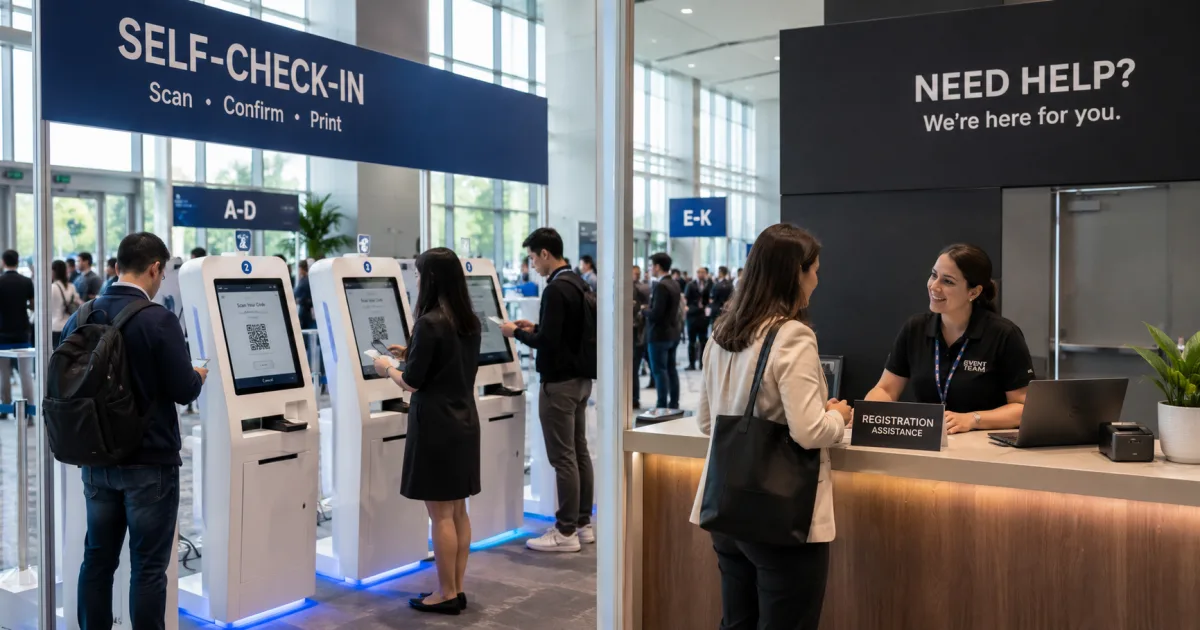
Where kiosks earn their cost. Kiosks remove the human bottleneck from the standard transaction, which matters most when your peak-minute volume is high. A bank of kiosks scales more predictably than staffed desks, since adding a kiosk is a hardware and space decision, not a hiring and training decision. For conferences above roughly 1,500 to 2,000 attendees, kiosks typically pay for themselves in reduced line length even after accounting for rental and setup cost.
Where staffed desks are still necessary. Walk-up registrations, group badge pickup for sponsor or exhibitor teams, name corrections, payment issues, and VIP or speaker handling all need a human. Routing 100% of traffic to kiosks without a staffed exception lane just moves the bottleneck from the badge table to the kiosk queue, since every unresolved kiosk error now has nowhere to go.
A workable split. A commonly used allocation is roughly 70 to 80% of attendees routed to self-serve kiosks or unassisted QR-scan stations, with the remaining 20 to 30% (walk-ups, group pickups, exceptions) routed to staffed desks. Signage at the entrance that clearly separates "I have my QR code" from "I need help" prevents attendees from defaulting to the staffed line out of habit.
Plan for device failure. At scale, count on some percentage of kiosks or scanning devices failing or needing a reboot during your peak window. A reasonable planning ratio is one spare device on hand for every five in active use, with a staff member whose specific job during the peak is swapping and troubleshooting hardware rather than checking in attendees.
For a deeper breakdown of kiosk hardware, placement, and setup logistics, see our self-check-in kiosk setup guide.
Badge Strategy: Pre-Printing vs. Print-on-Demand at Volume
Badge strategy has more effect on line speed at this scale than almost any other single decision, because it determines whether check-in is "confirm and hand over a badge" or "look up, generate, and print a badge" for every single attendee.
Pre-printing works best above roughly 500 attendees with a stable registration list. Printing and alphabetically sorting badges the day before turns check-in into a pickup transaction: scan the QR code, confirm the name, hand over a pre-sorted badge. That can bring transaction time down to single digits in seconds per person. The tradeoff is that pre-printing commits you to a print cutoff, typically 24 to 48 hours before the event, after which late registrations and name changes route to a separate resolution desk rather than the main line.
Print-on-demand adds real time per transaction but handles late changes cleanly. Printing a badge at the point of check-in typically adds 15 to 30 seconds per person under good conditions, more if printer hardware struggles under sustained load. At high volume, that difference is the gap between a check-in operation that clears its peak in 45 minutes and one that is still processing a line an hour after doors open.
The practical answer for large conferences is usually both. Pre-print for every attendee registered by your cutoff, and run one or two print-on-demand or kiosk-print lanes specifically for late registrations, walk-ups, and corrections. This keeps the bulk of your volume moving at pickup speed while still accommodating the reality that a conference with 1,000+ attendees will always have some percentage of late adds.
Event Check-In
Check-in, badges and attendance in one system
Scan attendees in, print badges on the spot and keep attendance synced with registration, so lines move and the counts are right.
Home printing and mobile badges reduce on-site volume further. For attendees who can print their own badge or use a mobile wallet pass before arriving, on-site check-in becomes a scan-and-walk-through rather than a pickup at all. See our guide on printing event badges at home for how to set that option up for attendees who opt in.
Staggering Arrivals to Flatten the Peak
Every calculation above depends on how compressed your arrival peak is. The single most effective, lowest-cost intervention available to organizers is flattening that peak before it hits the door.
Communicate a suggested arrival window, not just a start time. If your event opens at 8:00 AM, telling every attendee "doors at 8:00" all but guarantees a spike at 7:50 to 8:00. Suggesting a 90-minute arrival window in confirmation emails, with light incentives for early arrival (coffee, a raffle entry, exhibit hall preview access), spreads volume that would otherwise cluster into a single 15-minute crunch.
Segment arrival windows by registration type or track. Assign different suggested arrival times to attendees by badge type, last name range, or session track. Exhibitor staff badge pickup in particular should have a dedicated, earlier window (often 60 to 90 minutes before general attendee doors) so it does not collide with the main arrival wave.
Open check-in earlier than the program officially starts. Opening check-in 30 to 45 minutes before the first keynote absorbs the attendees who arrive early regardless of what you communicate, and gives your team a lower-pressure warm-up period before peak volume hits.
Use multi-day check-in to your advantage. For conferences spanning several days, badge pickup that happens on day one (evening registration, pre-conference workshops) removes that attendee from the day-two morning peak entirely. Even shifting 15 to 20% of attendees to an earlier pickup window measurably reduces the size of the crowd your stations need to absorb on the busiest morning.
For more on managing the specific first-impression risk of a slow front door, see our guide on reducing door wait times at conferences.
Why Offline-Capable Scanning Matters at This Scale
Large venues, convention centers, hotel ballrooms, and temporary exhibit spaces are not always built for the network load a check-in operation puts on them. A device count of 1,000+ attendee phones and dozens of staff scanning devices all connecting to the same venue WiFi at once is a realistic stress test that many networks fail, at exactly the moment you can least afford it.
Cloud-only scanning is a single point of failure. If your check-in app requires a live round trip to a server for every scan, a network slowdown does not just add lag, it can stall every station simultaneously, since the bottleneck is shared infrastructure rather than any one table.
Offline-first scanning caches the attendee list locally. With the attendee list and duplicate-check logic stored on the device itself, scanning continues even if the venue network degrades or drops entirely, syncing confirmed check-ins back to the central system once connectivity returns. At the scale of a 1,000+ attendee event, this is less an optional feature and more a baseline requirement.
Test offline mode before event day, not during it. Turn off WiFi on a check-in device during a rehearsal and confirm scanning still works and duplicate detection still functions. A check-in system that has never been tested offline should be assumed to fail offline.
Real-time sync across stations avoids duplicate check-ins. Once connectivity is restored, every station needs to reflect the same check-in state so an attendee who picked up their badge at Station 3 does not get flagged as unregistered when they later approach Station 7 for an unrelated reason.
Common Failure Modes at Large-Scale Check-In
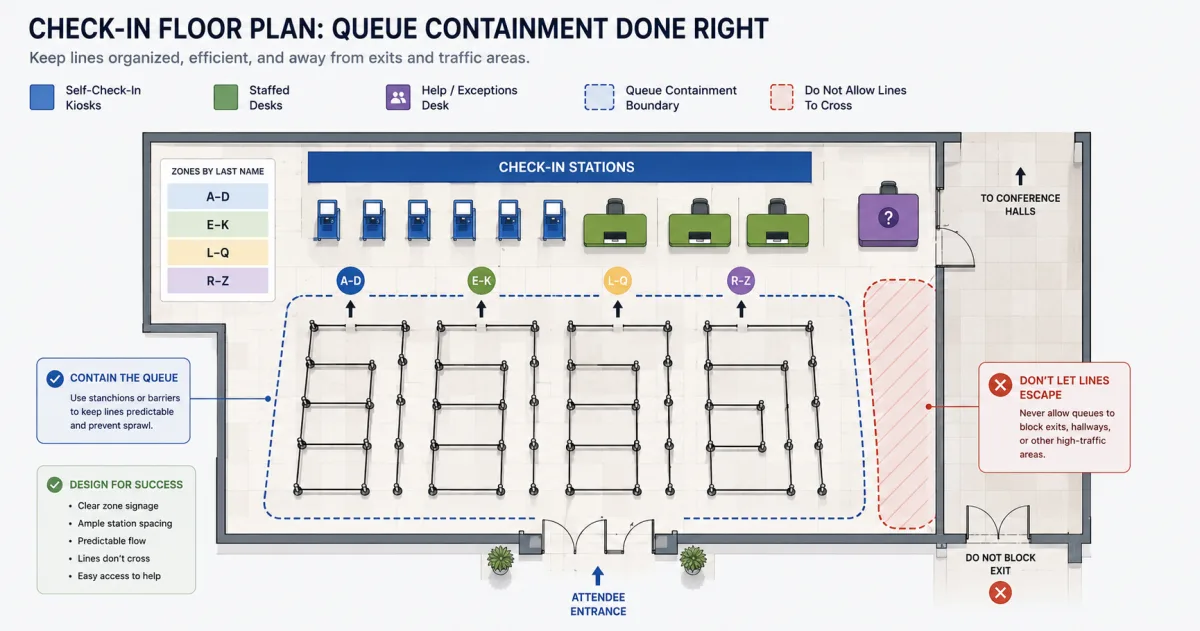
Even with good math, large-conference check-in operations tend to fail in a handful of predictable ways:
A single line feeding multiple stations. Parallel, independently-queued stations consistently outperform one line that funnels into several tables, because a slow transaction only affects the people behind it at that one station rather than everyone in a shared queue.
No dedicated exception desk. When name changes, group pickups, or "I'm not in the system" cases get handled at the main stations, each one stalls the line behind it. A separated resolution desk, staffed by your most experienced person, keeps exceptions from becoming a bottleneck for everyone else.
Understaffing the first 30 to 60 minutes specifically. Total staffing for the day can look adequate on paper while still being wrong for the peak window, since the peak often absorbs the majority of the day's total check-in volume in a fraction of the day's total hours.
Kiosks or stations placed without a tested power and network plan. A kiosk that has not been confirmed to have reliable power and connectivity at its actual physical location is a liability discovered at the worst possible time. Walk the floor plan and test every station location in advance, not just the ones near an obvious outlet.
No floor manager empowered to open overflow capacity. If the person watching queue depth in real time does not have the authority to redeploy staff, open an additional lane, or call for backup badge stock without checking with someone else first, minor backups turn into major ones while approval is sought.
Queue lines that back into unsafe or non-compliant space. At large scale, a check-in line is a crowd-safety consideration, not just a customer-experience one. Lines that extend into stairwells, fire exits, narrow hallways, or public sidewalks can create real compliance problems. Design queue containment (stanchions, floor markings, a maximum queue length before staff redirect to an overflow lane) as part of your floor plan, not as an afterthought.
Running out of badge stock or printer consumables mid-event. At volume, printer ribbon and blank badge stock get consumed faster than organizers expect. Budget spares generously and assign one person the specific job of monitoring supply levels during the peak window.
A Worked Example: Check-In Plan for a 2,800-Attendee Conference
To make the math concrete, here is how the formula above translates into an actual plan for a mid-size annual conference.
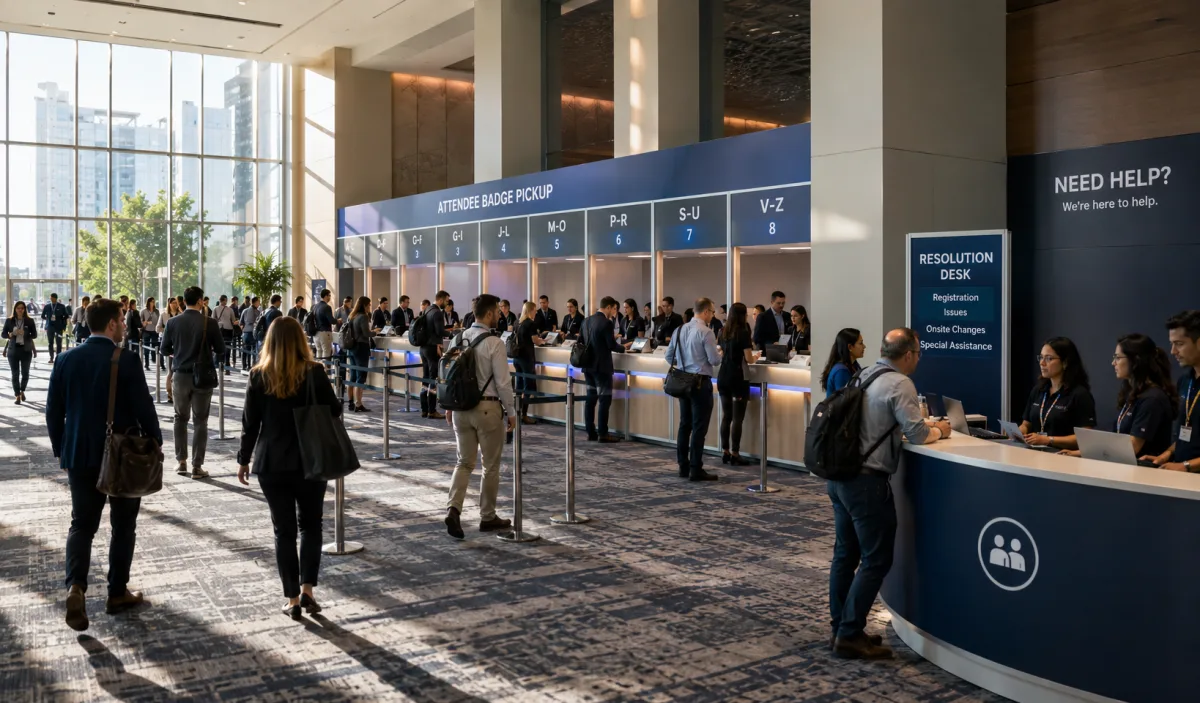
Assumptions:
- 2,800 total attendees, including roughly 300 exhibitor staff badges
- Doors open at 8:00 AM, keynote at 9:00 AM
- 60% of attendees expected in the 60 minutes before the keynote (1,680 people)
- Process: pre-printed badges for anyone registered by the 48-hour cutoff, QR scan pickup
Plan:
- Exhibitor staff badge pickup opens at 6:30 AM at a separate desk, absorbing roughly 300 people before general attendee doors open, removing that volume from the main peak entirely
- General check-in opens at 7:15 AM, 45 minutes before doors, to capture early arrivals ahead of the official peak
- Peak volume of 1,680 people in 60 minutes requires roughly 28 people per minute
- At 4 people per minute per station (pre-printed QR pickup), theoretical minimum is 7 stations
- Adding a 30% buffer brings the plan to 9 active pickup stations
- A separate resolution desk (2 stations) handles walk-ups, name corrections, and group pickups, staffed by the two most experienced team members
- Total station count: 11, plus exhibitor desk
- Floating staff: 3, at roughly 1 per 3 to 4 stations, tasked purely with directing traffic and watching queue depth
- Total on-site check-in staffing, including floaters and the resolution desk but not counting exhibitor desk staff: approximately 16 to 18 people, consistent with the 1-per-150-to-250-attendee planning ratio
- Signage divides the floor into three zones by last name range, each with three dedicated pickup stations, so attendees self-direct rather than funneling into one shared line
- Offline mode tested the day before across all devices, with WiFi deliberately disabled during the test
This is one workable configuration, not a universal formula. A venue with a wider or narrower entrance, an audience with a different mix of pre-registered versus walk-up attendees, or a different badge strategy will shift these numbers. The process, estimate peak volume, divide by realistic per-station throughput, add a buffer, and staff the resolution desk separately, holds regardless of the specific event.
Running Check-In at Scale with VenueSight
The math above works regardless of which platform runs your check-in, but the technology decisions still matter. VenueSight's check-in tools are built around the operational realities described in this guide, scoped to the conferences we actually support well: events in the 1,000 to 5,000 attendee range with substantial exhibitor participation.
Check-in runs on any iOS or Android phone or tablet using QR code scanning, so you can deploy as many simultaneous stations as your peak-volume math calls for without shipping proprietary hardware to every station. Every device shares the same real-time attendee data, meaning any station can check in any attendee and the status reflects instantly across every other device, which is what makes the parallel-station approach in this guide actually work in practice rather than just on paper.
For the badge strategy questions above, VenueSight supports instant badge printing and reprints directly from the check-in workflow, along with self-serve kiosk mode alongside assisted desks so you can run the hybrid split described earlier without stitching together separate systems. Offline-first scanning keeps stations working through venue network drops, syncing check-ins back once connectivity returns rather than stalling the line. Walk-up registration with on-site payment covers the exception cases that otherwise back up a resolution desk, and role-based permissions let you bring on temporary or volunteer staff for peak-day station coverage without giving everyone access to sensitive attendee or financial data.
None of this replaces the planning work in this guide. Station math, arrival staggering, and floor design still have to be done by your team based on your specific venue and audience. What the platform removes is the technical friction, disconnected scanning tools, badge printing that requires a separate system, and check-in data that does not sync in real time, that turns a well-planned check-in operation into a slow one anyway.
If you are planning check-in for a conference in the 1,000 to 5,000 attendee range, see how VenueSight handles event check-in or explore the large conference solution page for the full operational picture at this scale.