
How to Speed Up Conference Check-in for Large Events
Long check-in lines are one of the most common, preventable conference complaints. This guide covers process design, technology, layout, and staffing ratios.
April 27, 2026
Long lines at check-in are one of the most persistent complaints attendees have about conferences — and one of the most preventable. With the right combination of process, technology, and floor layout, even large conferences can move their entire peak arrival crowd through check-in without a queue forming.
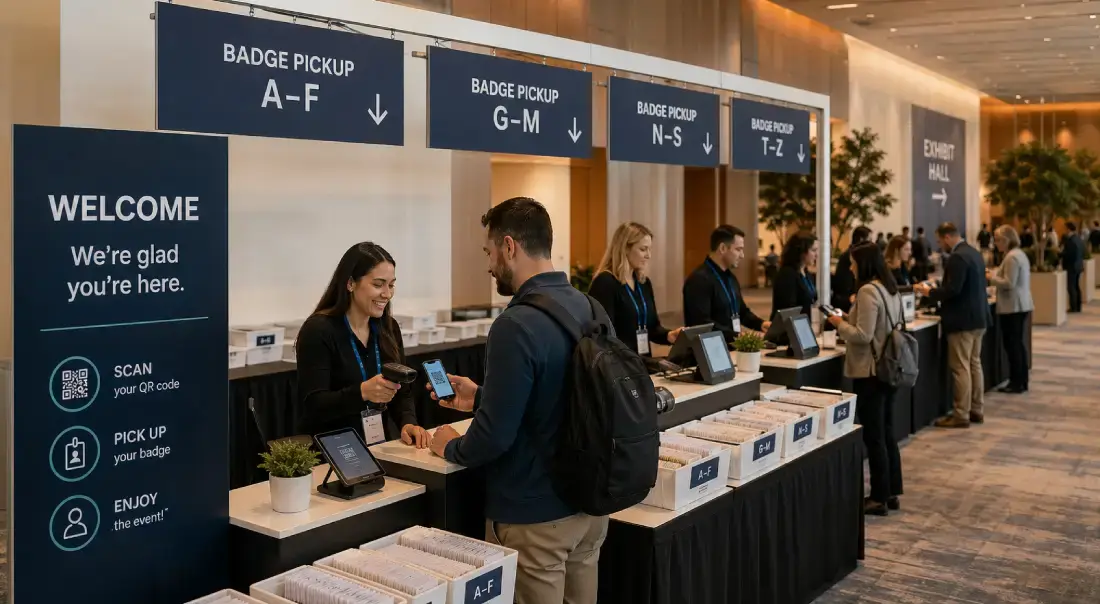
This guide covers what actually causes check-in bottlenecks, the operational decisions that eliminate them, and how to build a check-in process that's invisible to attendees because it works.
Why Check-in Lines Form
Check-in lines are rarely caused by a single failure. They're almost always the result of several compounding issues that interact in ways that make each one worse:
Manual lookup. Staff searching alphabetically through printed lists or scrolling through a spreadsheet to find a name slows every transaction to 45–90 seconds per attendee. At 600 people arriving in the first 30 minutes, that's the eantire first hour consumed by lookup alone.
Underprepared stations. Too few stations, positioned incorrectly, or staffed with people who haven't been trained on the system before the morning rush. A staff member learning the check-in software while attendees queue behind them is a predictable failure.
Name badges not pre-printed. On-demand badge printing takes 15–30 seconds per badge under ideal conditions — more if the printer jams, runs low on ribbon, or needs a reboot. That time adds directly to every check-in transaction.
Attendee confusion. No clear signage telling attendees where to go based on last name, ticket type, or session track. Attendees who arrive at the wrong station and need to be redirected create ripple delays.
System performance. Cloud-dependent check-in tools that slow down when the venue's WiFi is hit by 1,000 devices connecting at once. This is more common than vendors admit — and the failure usually happens at the worst possible moment.
Poor exception handling. No process for will-call, name changes, and walk-ins. These exceptions handled at the primary station block everyone behind them.
Most of these are solvable before the event starts.
The Math Behind Check-in Throughput
Before making decisions about stations and staffing, run the numbers.
Peak arrival window. For most conferences, 60–70% of total attendees arrive within the first 45–60 minutes of the check-in opening. A 1,000-person conference should be planned around 600–700 arrivals in the first hour.
Transaction time per attendee. With pre-printed badges and QR scan check-in, average transaction time drops to 8–15 seconds. With on-demand printing, expect 25–45 seconds. With manual lookup (no QR code, staff searches by name), expect 45–90 seconds.
Station capacity. A single well-equipped station can process 4–7 attendees per minute using QR scan check-in with pre-printed badges. At 6 per minute, one station handles 360 attendees per hour.
Required stations for peak load. Divide your peak arrival volume by the hourly capacity of one station. For 700 arrivals in 60 minutes at 360/hour per station: 700 ÷ 360 = approximately 2 stations at full theoretical capacity. Build in 50% buffer for real-world variability (attendees fumbling for phones, brief staff delays, exceptions). That means 3–4 stations minimum for a 1,000-person conference.
Scale this calculation to your specific event — the numbers change dramatically based on how fast your check-in system actually operates and how efficiently your stations are set up.
Pre-Event: The Work That Eliminates Lines
The highest-leverage actions happen before event day.
Pre-print all badges
Printing badges in advance removes 15–30 seconds per attendee from your check-in time. Sort them alphabetically by last name into labeled bins or accordion files. A 1,000-person conference can pre-print and sort all badges in a few hours the night before the event.

The tradeoff: pre-printing commits you to your attendee list. Any late registrations, name changes, or additions after your print cutoff go to a separate will-call pile handled at a resolution station. Set your pre-print cutoff 24–36 hours before the event opens.
Send QR codes in advance
Every registered attendee should receive a unique QR code in their confirmation email — ideally as a direct image, not just a link to a page. On event day, check-in is a scan. Attendees who come prepared reduce your average transaction time to under 10 seconds.
QR codes should also be accessible in the event app or in a "your registration" link that works without cell service (since venues often have poor mobile signal). Test this before the event.
Lock your attendee list 24–48 hours out
Locking the list before print time lets you pre-print accurately and distribute a finalized attendee list to your check-in team without last-minute additions creating discrepancies between the printed badges and the check-in system.
Walk-in registrations after lockout go to a manual queue at the resolution station. Price late registration slightly higher to discourage last-minute additions and encourage pre-registration behavior.
Run a data quality pass before printing
Before printing, review your attendee data for common issues: names in all-caps, placeholder text in name fields, names with incorrect formatting. A 20-minute data review before printing saves you from reprinting badges at the check-in table in front of a growing line.
Badge Printing Options and Trade-offs
Badge printing strategy significantly affects your check-in experience. There are three main approaches:
Pre-printed and sorted
Best for: events with a stable registration list and more than 150 attendees.
Print all badges before the event, sort into alphabetical bins or accordion files, and issue from the pre-sorted stack at check-in. Fastest check-in transaction time. Requires a print cutoff and a will-call process for exceptions.
On-demand printing at check-in
Best for: events with high rates of day-of changes, VIP or speaker badges that need different formatting, or smaller events where pre-printing logistics aren't worth the effort.
Each badge prints at the moment of check-in. Adds 15–30 seconds per transaction and requires printers that are reliable at high volume. Budget for spare ribbon cartridges and a staff member whose job is watching the printers.
Self-service kiosk printing
Best for: large conferences with enough space to deploy multiple kiosks and sufficient technology budget.
Attendees approach a kiosk, scan their QR code or type their name, and the kiosk prints their badge. Removes the human from the standard transaction and allows near-unlimited scaling through additional kiosks. Requires robust hardware and a staff member floating to handle kiosk issues.
Station Layout and Floor Design
The physical layout of your check-in area determines throughput as much as your technology does.
Run parallel stations, not a single queue
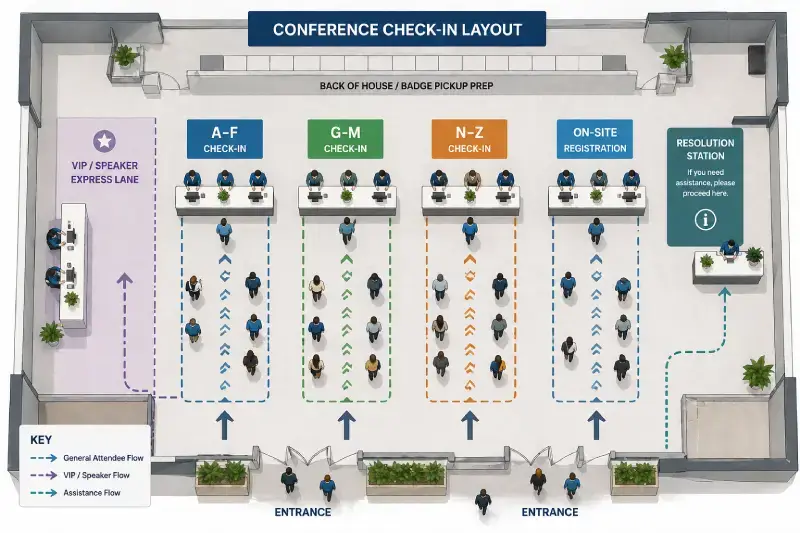
A single line feeding multiple stations is slower than dedicated stations with their own queue. Each station should be self-contained: scanner, printer (if printing on-demand), and a staff member who can handle standard check-ins plus minor exceptions.
When attendees can go to any open station, a slow transaction at one station doesn't block everyone behind it.
Position stations in alphabetical zones
Divide your stations by last name (A–F, G–M, N–Z, or A–D, E–K, L–Q, R–Z for larger shows) and post clear signage at the entrance to the check-in area. Attendees who can self-direct to their station don't form a single funnel.
Label your bins to match your zones — every badge for A–F is in the A–F bin at the A–F station. When a staff member needs to find a badge, they're looking at one-third or one-quarter of the total pile.
Event Check-In
Check-in, badges and attendance in one system
Scan attendees in, print badges on the spot and keep attendance synced with registration, so lines move and the counts are right.
Separate VIP and speaker check-in
Give speakers, sponsors, and VIP attendees a dedicated station away from the main flow. This prevents high-touch interactions — badge exchanges, schedule discussions, green room directions — from slowing the general line. Your most important attendees shouldn't be standing in a queue.
The VIP/speaker station can be smaller and less obviously placed. It's not about prestige display; it's about operational separation.
Designate a problem-resolution station
One station should handle will-call, group registrations, name changes, attendees whose registration can't be found, and walk-in registrations. Keeping exception handling off the primary stations prevents one difficult situation from blocking the queue behind it.
Position the resolution station to the side, clearly labeled. Staff it with your most experienced person who knows the registration system well enough to handle anything.
Design for attendee flow, not just footprint
Check-in areas are often set up to maximize the number of stations that fit in a given space, without thinking about how attendees arrive, move through, and exit. Consider:
- Where do attendees enter the building? Can they see the check-in area immediately?
- Is there a natural queue formation path, or will attendees pile up randomly?
- After check-in, where do attendees go? Is there a clear exit path that doesn't conflict with the entry path?
- Is there space for attendees to pin badges, put phones away, and collect themselves before moving to the main event space?
A check-in area with great throughput but poor flow creates a physical traffic jam at the exit side.
Staffing: Roles, Ratios, and Briefings
Calculate staffing from your peak load
If you anticipate 600 attendees arriving in the first 45 minutes, and each check-in takes 15 seconds on average, you need a minimum of 4 stations running at full capacity. Add 1–2 float staff for the resolution station and coverage during breaks.
Brief every station staff member before opening
Each person should know: how to operate the scanner or check-in system, where to find pre-printed badges, how to handle an attendee whose name isn't in the system, and exactly where to send edge cases (the resolution station, not "let me get my manager").
Run a 10-minute briefing and a live drill before doors open. Staff who've physically checked in one practice attendee before the rush perform noticeably better under pressure.
Assign floating staff
One or two staff members who don't own a station should float during the peak rush. Their job is to direct arriving attendees to the correct zone, watch for lines building at specific stations, and redeploy to help when a station gets backed up.
Floating staff dramatically improve throughput in the first 30 minutes — the period when your lines are most at risk of forming.
Technology Requirements for High-Volume Check-in
Your check-in technology should work with your process, not against it.
Offline capability — non-negotiable
Venues have unpredictable WiFi, especially at peak load when 1,000 devices connect simultaneously. Your check-in app must cache the full attendee list locally so check-in works if the connection drops. Any cloud-only system is a liability at large conferences.
Test offline mode before the event. Log in, disable WiFi, and attempt check-in. If it fails, you have a problem to solve before event day.
QR scan speed
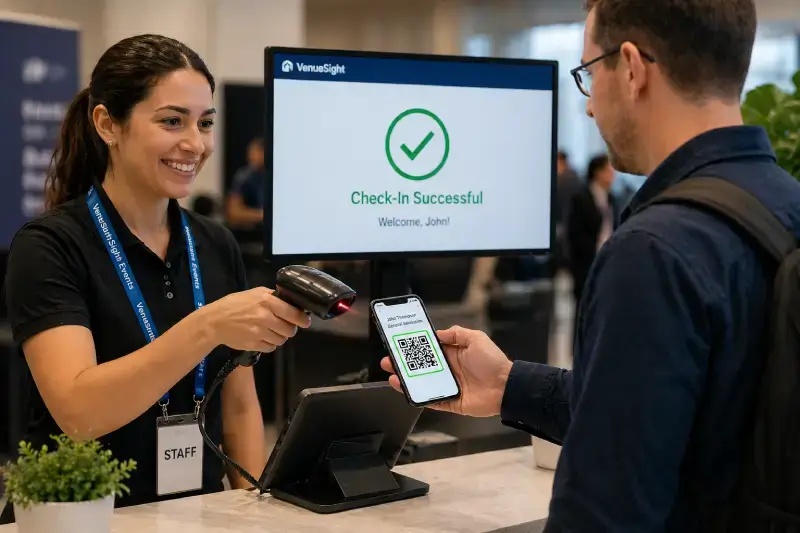
There's a meaningful difference between check-in systems that confirm a scan in under one second and those that take 2–3 seconds per scan. At 600 attendees, every extra second of per-scan delay costs you 10 minutes of throughput — a 2-second lag means 20 cumulative minutes of wasted time that directly extends how long your check-in window runs. Ask vendors for documented scan-to-confirmation time on their system.
Real-time sync across stations
Once an attendee checks in at Station 2, Station 5 should reflect that immediately. Duplicate check-ins (an attendee who picked up their pre-printed badge then tries to scan at another station) create confusion and inflate your counts.
Name search fallback
When QR codes don't scan — phone brightness too low, screenshot cut off, app not loading — staff need to find attendees by name in under 5 seconds. The search should work on partial name and return results without requiring an exact match.
Live dashboard for organizers
You should be able to see, in real time: total attendees checked in, check-in rate per station, current capacity remaining. This data lets you spot problems (one station moving much slower than others) while there's still time to intervene.
Day-of Execution
Open check-in 30–45 minutes before doors
Attendees arrive earlier than scheduled. Opening check-in before the official start time distributes arrivals and prevents the first-minute rush. Communicate the early check-in opening time in your confirmation emails.
Monitor queue depth in real time
If one zone is building a line while others are clear, redeploy float staff immediately. Waiting until a problem is obvious means it's already delayed dozens of attendees. Assign one person whose job during the first 45 minutes is purely observation — they're watching lines, not operating a station.
Have a badge backup plan
Pre-printed badge doesn't match? Attendee legally changed their name since registration? Keep a supply of blank badge stock and a portable printer at the resolution station. Don't hold up the main flow for a name correction.
Communicate with attendees before they arrive
A pre-event email sent 24 hours before the event that says "Find your QR code below — it's how you'll check in" reduces the number of attendees who show up without it. Include the QR code as an image in the email body, not just a link.
Handling Exceptions Without Slowing the Line
Will-call attendees are those whose registration was placed by a third party (a company, sponsor, or group organizer) and who may not have their own confirmation. Will-call needs its own badge pile, sorted by registrant name, at the resolution station.
Walk-in registrations require a streamlined process. If you accept walk-ins, they should complete registration on a device at the resolution station and receive a temporary badge while their proper badge is printed. Don't have them stand at the main station.
Group check-ins — a sponsor rep picking up 20 badges for their booth staff — should be handled at the resolution station with a pre-packaged group envelope. Prepare these the night before.
Attendees who can't be found in the system are usually there under a name variation or a colleague's email. The search fallback should handle name variations. If they genuinely aren't in the system, collect their information, issue a temporary badge, and investigate separately — never hold them at the main station.
Self-Service Kiosk Check-in
Kiosk check-in removes the human from the standard transaction and can scale without additional staff. An attendee approaches the kiosk, scans their QR code from their phone, and the kiosk prints their badge in under 10 seconds. They pick up the badge and move on.
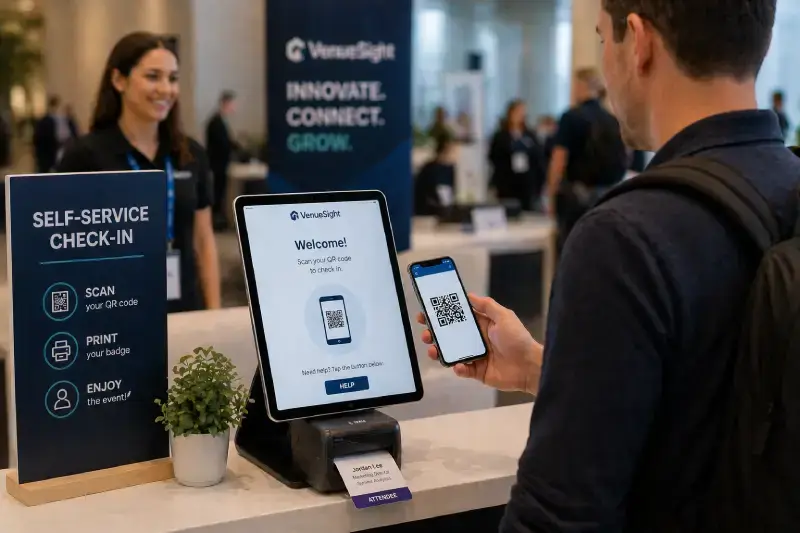
Where kiosks work best: events with a consistent attendee profile (tech-comfortable audience), events with a large venue footprint where multiple kiosk stations can be spread across the entry area, and events where badge printing cost doesn't create a reason to pre-print.
Where kiosks create friction: events with an older or less tech-comfortable audience who will require staff assistance at each kiosk interaction anyway, or events where the kiosk printer jam rate negates the throughput gain.
Hybrid approach: deploy kiosks as the primary check-in path and staff one or two manned stations for attendees who prefer or require assistance. This works for the largest conferences — 3,000+ attendees — where the volume justifies kiosk hardware investment.
Post-Check-in: Data and Follow-through
Monitor check-in rates against registration. A real-time dashboard showing check-in percentage lets you identify no-shows early enough to release reserved seating, release unclaimed session capacity, or contact attendees who may have the wrong date.
Use check-in data in post-event reporting. Your actual attendance number (checked-in attendees, not registrations) is the figure that matters for sponsor reporting, session popularity measurement, and year-over-year growth tracking. Make sure this number is clean in your system before closing out the event.
Feed check-in timing data back into planning. When did your peak check-in volume actually occur? How long did it take to reach 50% checked in? 90%? This data should inform your staffing, station count, and opening time decisions for next year.
Running Check-in with VenueSight
VenueSight's check-in tools are designed for the operational demands of large conferences and trade shows. The attendee list syncs offline to the check-in app so connectivity problems don't stop your team. QR codes are distributed automatically with confirmation emails. Badge printing integrates directly with check-in scanning — scan, confirm, print, done. And your team gets real-time visibility into check-in counts and station performance from a single organizer dashboard.
If you're planning a conference and want to eliminate the check-in line problem, see how VenueSight handles check-in at scale or explore the full conference management platform.
Frequently Asked Questions
-
VenueSight is built for high-volume check-in: the attendee list syncs offline to the check-in app so connectivity issues do not stop staff, QR codes are distributed automatically with confirmation emails, and badge printing is integrated directly into the scan flow, with real-time station-by-station performance visibility for organizers.
-
Yes. VenueSight's check-in app caches the attendee list locally and continues scanning and printing offline, syncing scan data automatically once connectivity returns, so a WiFi outage at the venue does not stop the line from moving.
-
Yes. VenueSight's organizer dashboard shows check-in counts and station-by-station performance live during the event, so staffing can be reallocated to a slow station before a queue backs up, instead of finding out after the fact.