Group Registration: A Complete Guide for Event Organizers
Manage corporate teams, associations, and exhibitor groups with group registration pricing, data collection workflows, and roster management strategies.
July 28, 2026
Group registration — one purchaser buying for multiple attendees — is fundamental to how events actually work. A corporate team books 15 seats. An association chapter buys 20 registrations. An exhibitor signs up 5 staff members. Yet many event platforms were designed around individual transactions and struggle when groups are involved. This guide covers what group registration actually requires, how to price for groups, when to collect attendee data, and how to avoid the operational failure modes that kill the attendee experience and slow your revenue collection.
What is Group Registration
Group registration is a transaction where a single buyer (the purchaser) books multiple seats and provides attendee details for some or all of those seats at the time of purchase, or delegates that responsibility to attendees after purchase.
Group registration
The key distinction from individual registration is the decoupling of buyer and attendee. With individual registration, the person buying the ticket is the person attending. With group registration, the buyer is often an admin, coordinator, or department head managing the purchase for their organization.
This creates two parallel workflows:
The buyer's workflow: finding the right group package, calculating total cost, handling payment
The attendee workflow: receiving their registration confirmation, customizing their event experience (session selections, dietary restrictions, networking preferences)
A platform that handles only the buyer's side leaves you with incomplete attendee data. A platform that forces attendees to complete registration independently creates friction and abandonment.
When Group Registration Matters
Group registration is essential in three scenarios:
Corporate Events and Team Bookings
When a company sends a team, someone in HR, operations, or the department head buys for everyone. They need to know total cost upfront, possibly purchase against a budget code or PO, and they want a single invoice. The attendees receive their own confirmations but may not care about the transaction details.
For a corporate conference with 500 attendees, 40% might come through group bookings: 15 teams of 10–30 people buying together. Without group pricing, you lose competitive advantage against platforms that offer bulk discounts.
Association Chapters and Delegations
Associations often have chapters or regional groups that coordinate attendance. A chapter president buys 25 seats for their members. They need group pricing, a way to assign tickets to specific members, and ideally a way to track which members actually attend.
Exhibitor Staff and Vendor Passes
Exhibitors often purchase booth staff passes as a group. An exhibitor buying 8 booth staff passes needs group pricing, and they need those passes to be linked to their booth for reporting and lead retrieval access. This is a hybrid transaction: not fully a ticket sale (staff passes often have different rules), but group-based nonetheless.
Group Pricing Models
There are four common ways to price groups:
1. Per-Person Pricing (No Discount)
The simplest model: price is per attendee, same as individual tickets. A group of 10 pays 10 × the individual price. No volume incentive, but no complexity either.
When to use: early-stage events where you don't yet know if groups will be significant, or events where you want to avoid discount cannibalizing individual sales.
2. Flat Group Discount
A fixed discount applied to groups above a threshold. Example: individuals pay $299; groups of 5+ pay $250/person.
When to use: you want to incentivize group bookings and simplify pricing. Easy to communicate. Risk: someone buys 4 individual tickets and then a fifth from a competitor to hit the group threshold.
3. Tiered Volume Pricing
Different price points at different group sizes. Example:
1 ticket: $299
2–5 tickets: $275 each
6–10 tickets: $250 each
11+ tickets: $225 each
When to use: most events. Scales incentives to larger groups without a sharp cliff at a specific threshold.
4. Custom Negotiated Pricing
For very large groups (100+ attendees), set custom rates. Often paired with sponsorship or exhibitor discounts.
When to use: you have predictable large-group buyers (corporations, associations, exhibitor networks) and want to negotiate multi-year volume agreements.
Pricing Psychology
Groups compare total cost against per-person budgets. A team of 10 with a $2,500 budget cares about reaching $250/person, not individual ticket prices. Present group pricing that hits meaningful per-person thresholds: $199, $249, $299. Avoid obscure numbers.
Also: never surprise groups with add-on fees at checkout. If catering is $25/person, build that into group pricing upfront. Hidden fees destroy group conversions.
Collecting Attendee Data From Groups
The critical decision: when do attendees provide their details?
Option A: Attendees Provide Details at Purchase
The group buyer provides a list of attendee names and emails. During checkout, the platform collects: full name, email, job title, company, dietary restrictions, session preferences, and any custom fields you require.
Advantage: you have complete data before the event. Disadvantage: higher friction at purchase (a buyer entering 20 attendee profiles is tedious), higher error rate, slower checkout.
The group buyer provides a list of attendee names and email addresses. After purchase, each attendee receives an email with a personalized link to complete their profile (job title, company, dietary restrictions, session selections).
Advantage: faster at checkout, attendees own their data accuracy. Disadvantage: some attendees won't complete their profiles, creating gaps in your data. Takes 3–7 days post-purchase to close those gaps.
Option C: Buyer Provides Minimal Data
The group buyer provides only attendee count and email list. Attendees self-register using a shared promo code that applies group pricing.
Advantage: simplest for the buyer, attendees fully self-serve. Disadvantage: you have no visibility into which attendees belong to which group until registration is complete. Difficult to manage group rosters or enforce group count limits.
Best Practice
Hybrid approach: offer Option A for small groups (1–10 attendees) to keep friction low, and Option B for larger groups (10+). Let the buyer choose which they prefer during checkout. If they choose Option B, set a deadline 2 weeks pre-event for attendees to complete profiles, then your operations team can follow up on stragglers.
For session-based events (conferences with track selections), require session selection during this phase, not at check-in. Attendees who wait until the event to select sessions often pick overcrowded tracks.
Conference Registration
Registration that feeds check-in, badges and reporting
Custom forms, group bookings, discounts and invoicing, with every registrant flowing straight into check-in and reporting.
Payment and Invoice WorkflowsPayment and Invoice Workflows
Groups expect PO/invoice payment flows, not credit card only. Here's what to support:
Credit Card (Online Payment)
Standard. The buyer pays by card at checkout. Simplest for you, immediate funds, low friction for small groups. For large groups ($10k+), offer 2-3% discount for credit card payment to incentivize it.
Invoice / Payment Terms
The buyer requests an invoice and pays via bank transfer within 30 days (or another term). You issue an invoice, they process it through accounts payable, payment arrives later.
Critical: Decide whether payment is required before or after you send the invoice. Best practice: send the invoice immediately (automate this), but don't activate the registration until payment clears. Gives the buyer time to process, doesn't hold you hostage to their accounting timeline.
Purchase Orders (POs)
Some organizations require a PO in your system before they can pay. You're not likely to build a full procurement system, but you can:
Accept PO numbers in the registration flow
Issue an invoice matching the PO number
Use the PO number to track the payment
Group Vouchers / Promo Codes
If a group has negotiated a discount, issue them a promo code that applies the group rate when they check out. Simpler than custom invoicing, but doesn't track which attendees used the code.
Best Practice for Large Groups
For groups >50 attendees: contact them directly before letting them register online. Understand their payment process, quote a custom rate, issue an invoice, collect PO if needed, activate registration once payment clears. Treat it like a B2B sale, not a ticketing transaction.
Managing Group Roster Changes
Groups change after purchase. A team member quits, someone decides not to go, a replacement joins. Your system must handle roster edits.
Real-Time Roster Updates
The group buyer should be able to log in, view their roster, and:
Add attendees (using unallocated seats from their purchase)
Most platforms charge for additions but allow removals free. Pricing: if someone paid $250/seat and removes an attendee, do you refund $250 and make that seat available for resale, or do you keep the revenue? Most events keep the revenue (removal at no refund) to simplify accounting.
Seat Reallocation
If a group bought 20 seats and a buyer wants to swap names, that's a reallocation: remove person A, add person B. Same group size, different attendees. Should be free and instant.
Attrition and Partial Refunds
If a group of 20 shrinks to 15, who owns the 5 unused seats? If they purchased at $250/seat, do they owe $1,250 for those empty seats?
Common approaches:
No refund: group paid for 20, keeps those 20 active (empty seats don't attend). You maintain revenue, but your actual attendance is lower than your registrations. Commonly used in corporate events.
Pro-rata refund: group paid $5,000 for 20 at $250/seat. If they use only 15, refund $1,250. Adds accounting overhead but feels fairer to the buyer.
Refund with cliff: refund only if attrition exceeds 10%. So a group of 20 can drop to 18 free; 17 and below triggers a refund. Balances buyer fairness with your revenue.
Document your policy clearly, and enforce it consistently across all groups.
Badge Printing for Groups
Badge printing is where group registration becomes operational:
Pre-Printed Badges
If group attendees are known weeks in advance, print all badges before the event. Alphabetize them by group, band them together, pack them in a box labeled by group. At check-in, staff hand out a group's badge bundle instantly. Zero wait time per attendee.
Requires: attendee list locked in 2+ weeks pre-event, reliable printing vendor, secure storage, organized check-in logistics.
On-Demand (Print-at-Arrival)
Attendees arrive, staff print their badge on-demand at the check-in station. Handles last-minute changes but is slower (1–2 min per attendee at peak arrival).
Best for: dynamic attendee lists, small groups, or events where you can't predict exactly who's coming.
Hybrid
Pre-print badges for locked-in groups (corporate teams, pre-registered associations), print on-demand for late registrations. Most efficient.
For Group Buyers
Communicate the deadline clearly: "Submit your final attendee roster by [date] for pre-printed badges. Additions after [date] will be printed on-arrival and may experience wait times."
Common Failure Modes
Failure 1: Pricing Doesn't Reflect Group Size
Group pricing exists in the backend but isn't visible during checkout. A buyer sees $299/ticket, buys 20 individual tickets at $5,980, then complains they should have gotten a discount. Prevention: show the group price before checkout. "Buying 20+ tickets? Check our group pricing."
Failure 2: Attendee Data Collection Breaks Down
The buyer provides names, but the platform doesn't know who paid for whom. Check-in staff can't validate the attendee. Attendee details are scattered across multiple registrations. Prevention: link all attendees to the group purchase record. Attendees should show as "part of the Corporate X group" at check-in.
Failure 3: No Visibility into Which Attendees Actually Attended
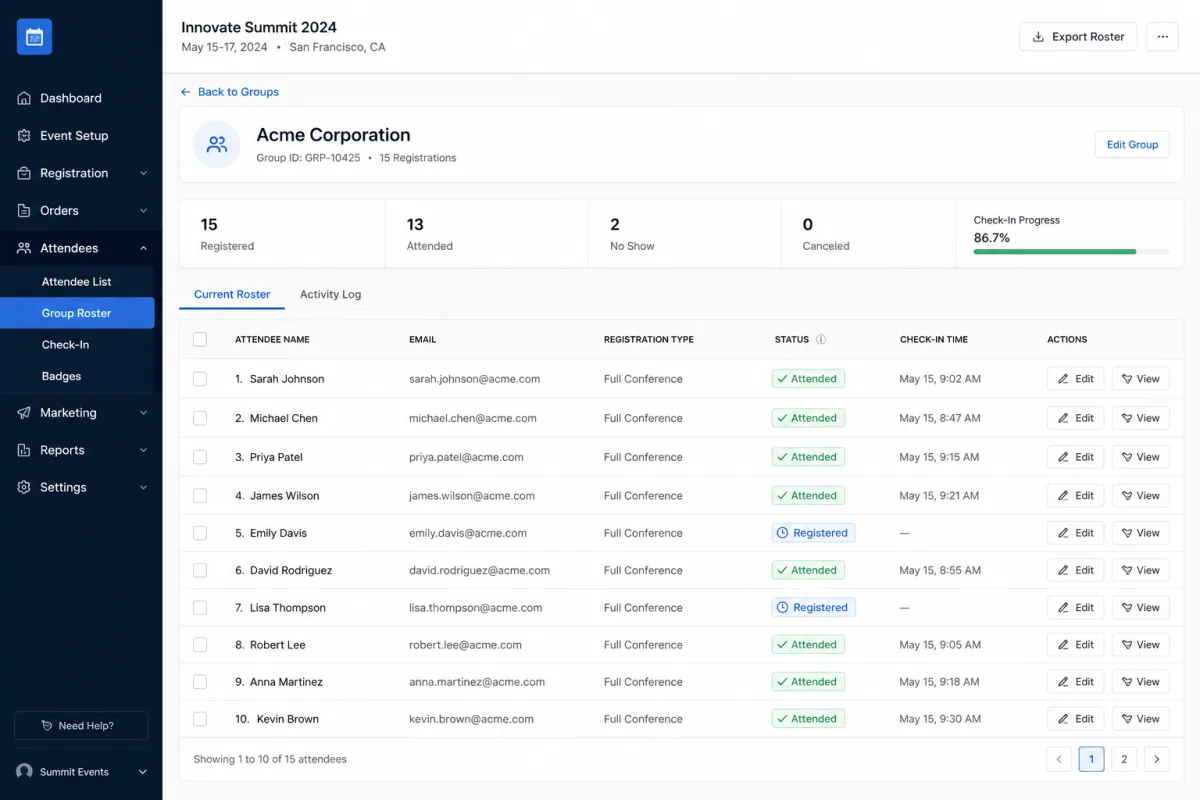
You know a group of 20 registered, but you don't know if 20 showed up or 12. Post-event reporting is broken. Prevention: use check-in to mark attendance, and in your reports, show both "registered in group" and "checked in from group." Track conversion from registered to attended.
Failure 4: Roster Changes Cause Invoice Confusion
A group paid $5,000 for 20 seats. Two people dropped out. Did the price change? Does the invoice need updating? Should payment be adjusted? Prevention: finalize group pricing upfront, and be clear about your refund policy. Once an invoice is issued, changes should trigger a revised invoice or a credit note, not a surprise charge.
Failure 5: Communication Breakdown Between Buyer and Attendees
The buyer registers the group but doesn't forward confirmations to attendees. Attendees don't know they're registered. They try to register individually, creating duplicates. Prevention: send confirmations to both the group buyer and each attendee. Make it clear in the attendee email that their registration is already paid by their organization.
Running Group Registration with VenueSight
VenueSight's group registration flow is built for this workflow. Buyers can add multiple attendees during checkout, or they can register just themselves and invite teammates to complete their profiles later. All attendees are linked to a single purchase record, which means:
Roster management is centralized: the group buyer (or a delegate) can modify the attendee list anytime pre-event
Payment is consolidated: one invoice, one payment, clear accounting
Check-in is seamless: staff see the group together and can hand out pre-printed or print-on-demand badges instantly
Reporting ties attendance back to the group purchase: you can see not just who registered, but who actually showed up
VenueSight also handles the payment workflows: invoice/PO terms, promo codes for negotiated group rates, and configurable refund policies so your group pricing rules are enforced consistently.
VenueSight's group registration flow lets a buyer register a full team in one checkout, or purchase seats and invite teammates to complete their own profiles later. All attendees link to a single purchase record, so roster edits, consolidated payment, and group check-in are handled without a separate group-booking tool.
Yes. VenueSight supports invoice and PO payment terms for group registration alongside standard credit card checkout, plus promo codes for negotiated group rates, so procurement-driven buyers are not forced through a consumer checkout flow.
Yes. The group buyer or a delegate can modify the attendee roster anytime before the event in VenueSight, adding, removing, or reallocating seats from the original purchase, with changes reflected immediately in check-in and badge data.
Tagged with:
conferences
event registration
group registration
corporate events
registration management