
Registration Software for Complex Ticket Types and Session Capacity Limits
A ticket type doesn't guarantee a session seat. Learn to map ticket tiers to session capacity, handle waitlists, and stop overselling popular sessions.
August 28, 2026
A complex ticket type structure and a per-session capacity limit are two different systems that most organizers accidentally treat as one. A ticket type controls what an attendee is allowed to buy: general admission, VIP, member rate, group seat, add-on workshop. A session capacity limit controls how many bodies physically fit in a room. Selling an "All-Access" ticket to 600 people does not create 600 seats in a 40-person workshop, and the software that sold the ticket needs to know that before doors open, not after. This guide covers how ticket types should map to session eligibility, what should happen at capacity (waitlist, hard cap, or buffer), and the reporting organizers need to catch a session overselling itself before it becomes a badge-desk argument.

Why a Ticket Type Doesn't Guarantee a Session Seat
Consider a mid-size conference selling four ticket types: General Admission ($499), Member ($399), VIP All-Access ($899), and a Workshop Add-On ($150) that unlocks a hands-on breakout. All four types are correctly priced, correctly configured with access rules, and correctly synced to badge printing. None of that tells the room how many chairs it has.
The room holding the hands-on breakout seats 40 people. If 300 attendees hold a ticket type that technically includes workshop access, the ticket type answered "who is allowed to attend," not "who gets a seat." Those are sequential questions, and organizers who only answer the first one discover the gap at the door, when a badge scans as valid and there is nowhere for the attendee to sit.
This is the core distinction the rest of this guide works from:
- Ticket type is an entitlement. It says an attendee is eligible to register for a session.
- Session capacity is a physical constraint. It says how many of those eligible attendees can actually get in.
A registration system that only enforces the first constraint will always eventually oversell a room, because entitlement and capacity are unrelated numbers until someone explicitly connects them. The connection has to happen in the ticket type and session configuration itself, not in a spreadsheet someone checks the week before the event.
The most common failure mode is treating session selection as a courtesy field rather than an inventory transaction. If "which workshop would you like to attend?" is a free-text or unlimited-choice question on the registration form, the organizer has collected preference data, not a reservation. Preference data does not stop the 41st person from selecting the session that seats 40.
Mapping Ticket Types to Session Eligibility
Before capacity even enters the picture, organizers need to decide how ticket type and session access relate to each other. There are three common models, and picking the wrong one for a given event creates predictable problems.
Model 1: All ticket types can access all sessions (capacity is the only gate). This works for single-track conferences or events where every session is open seating with no premium tier. The registration system doesn't need to check ticket type at all when someone selects a session, only remaining capacity. Simple to configure, but it breaks down the moment an organizer wants to reserve a track for VIP holders or restrict a workshop to paid add-on buyers.
Model 2: Ticket type gates session visibility (some sessions are invisible to some ticket types). A General Admission ticket sees the main-stage agenda. A VIP ticket sees the main stage plus an executive roundtable capped at 25 seats. The roundtable never appears as an option for General Admission holders, so there's no risk of someone browsing into a session they were never entitled to attend. This is the cleanest model for tiered access because it prevents the mismatch before it happens, rather than declining it at the point of selection.
Model 3: Ticket type gates session eligibility, but the session is sold as its own product. This is the right model for add-on workshops, deep-dive labs, or a VIP dinner: something with its own price, its own capacity, and its own purchase decision, independent of the base ticket. A General Admission attendee and a VIP attendee can both be eligible to buy the workshop add-on; eligibility for the base ticket doesn't automatically grant a seat, purchasing the add-on does. This model is the right fit specifically because a 40-seat workshop needs its own inventory count that isn't diluted by however many thousands of general tickets get sold.
Most conferences with real ticketing complexity end up using a mix: Model 2 for premium tracks tied to ticket tier, Model 3 for opt-in workshops and paid add-ons. Deciding which sessions fall into which model is a setup-phase decision, and it should happen before ticket types go live, not retrofitted once general admission is already selling.
For events that also need to think through the base registration form itself, our guide to event registration form best practices covers question sequencing and field design that applies directly to where session selection sits in the flow.
Setting Per-Session Capacity: Hard Caps, Buffers, and Overbooking
Once eligibility is sorted, the second decision is what number to actually put on the room. Organizers consistently make one of two mistakes here: setting capacity to the fire-marshal maximum, or setting it to the number of chairs currently in the room without accounting for anything else that needs to happen in that space.
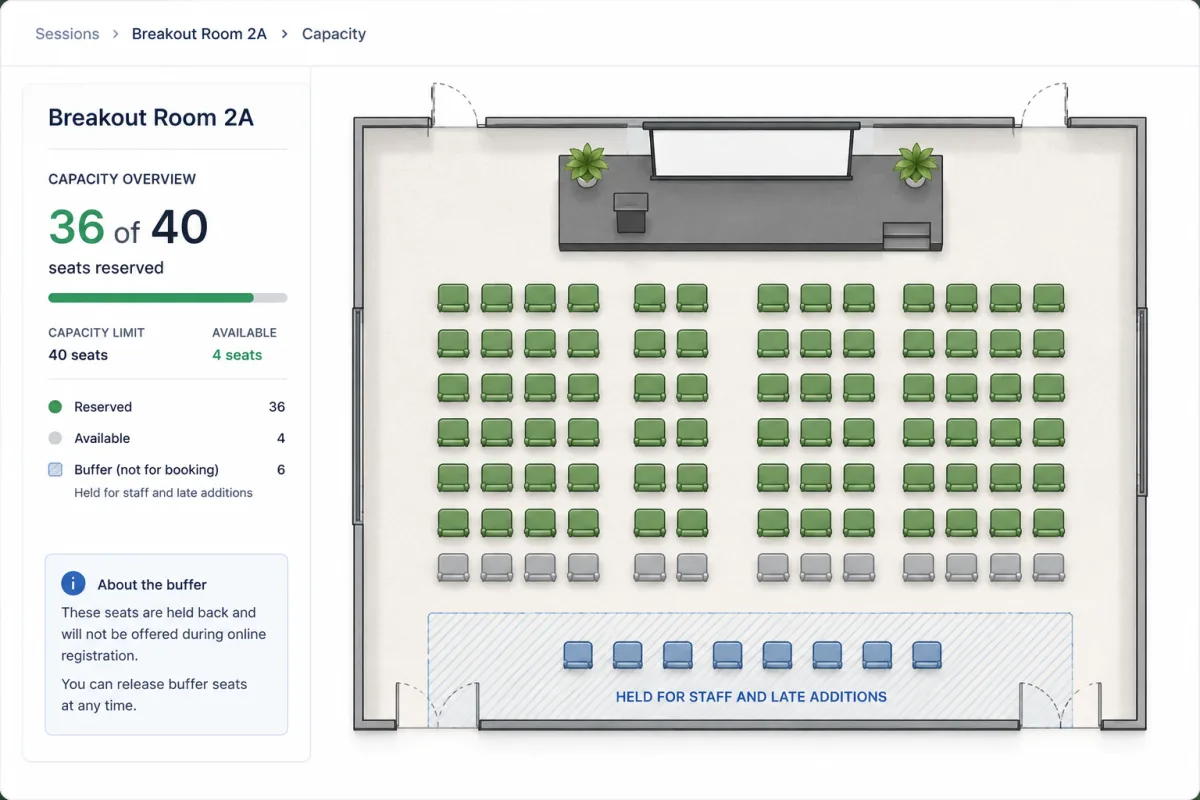
Set capacity below physical maximum, not at it. A room that seats 40 in fire-code terms rarely seats 40 attendees comfortably once a speaker table, AV cart, and a couple of standing staff are accounted for. Cap registration at 34 to 36 for a room whose stated maximum is 40, and reserve the difference as an operational buffer, not sell-through.
Reserve a specific buffer for late additions. Speakers often bring a co-presenter who wasn't in the original registration count. Press occasionally needs a seat. A sponsor executive gets added two days out. If registration sells every seat down to zero, any of these additions requires bumping a paying attendee, which is a worse outcome than simply not selling that last handful of seats to the general public. A buffer of 5 to 10 percent of session capacity, held back from public sale and released manually if unused, absorbs these additions without a confrontation at the door.
Decide deliberately on overbooking. Some organizers intentionally allow registration to exceed room capacity by a small margin (5 to 10 percent) because historical no-show rates for optional sessions run 15 to 25 percent. If a workshop has a 40-seat cap and the organizer's data shows a consistent 20 percent no-show rate for similar sessions, registering 46 to 48 people against 40 seats will likely land close to actual attendance. This only works with good historical data. An organizer applying an overbooking margin without prior no-show data for that specific session type is gambling, and if the workshop happens to be unusually compelling that year, the room genuinely overflows.
Hard caps are the safer default for anything irreversible. A catered VIP dinner, a hands-on lab with one workstation per attendee, or a session requiring individual equipment cannot absorb overbooking. For these, set the cap at the true physical or resource maximum minus a small buffer, and do not apply a no-show margin. The cost of running short on equipment or food is higher than the cost of a slightly conservative cap.
The decision between hard cap and overbooking buffer should be made per session, not once for the whole event. A 300-seat keynote room and a 12-person executive briefing need different math, and configuring both the same way guarantees one of them is wrong.
Waitlist Behavior When a Session Fills
What happens the moment a session hits its configured cap determines whether the rest of registration stays smooth or turns into a support queue. There are three behaviors organizers need to choose between, and each has a different cost.
Hard stop, no waitlist. The session simply shows as full and disappears as a selectable option. This is the simplest to configure and the worst for attendee experience: someone who wanted that specific workshop has no path forward except emailing the organizer and hoping a seat opens up. For low-stakes sessions this is acceptable. For a session that was a stated reason someone bought a ticket, it creates a support burden that a waitlist would have absorbed automatically.
Waitlist with manual release. Attendees who try to select a full session are offered a waitlist spot instead. When a registered attendee cancels or downgrades out of that session, the organizer manually reviews the waitlist and moves the next person in. This gives the organizer control over who gets pulled off the waitlist (useful if VIP or sponsor attendees should jump the line) at the cost of staff time spent monitoring it.
Waitlist with automatic release. The same mechanism, but the next eligible person on the waitlist is automatically granted the seat and notified the moment a spot opens, with no manual step. This scales far better for events with dozens of capacity-limited sessions running simultaneously, because no single staff member can manually babysit forty waitlists during a live event. The tradeoff is less control over ordering: automatic release typically works first-come-first-served, so an organizer who wants VIP ticket holders prioritized on the waitlist needs that priority built into the waitlist rule itself, not applied case by case after the fact.
Whichever behavior is chosen, the waitlist needs a visible cutoff. A waitlist that's still active and still notifying people 15 minutes before a session starts creates a genuine chance that someone shows up expecting a seat that was never actually released. Close waitlist releases far enough before the session (24 hours for a single-day conference, at the start of the event day for a multi-day one) that a released seat can actually be claimed and reflected on a badge or check-in record before the room fills.
It's also worth being explicit with attendees about what a waitlist spot means. "You're on the waitlist" reads very differently to an attendee than "You're on the waitlist, position 6 of 40 seats, and we release automatically as seats open." The second version sets expectations and reduces the number of "did I get in?" support emails an organizer fields in the days before the event.
The Overselling Trap: Total Tickets Sold vs. Total Session Capacity
The most damaging version of this problem isn't a single session overselling. It's an organizer who never checks whether the total number of session-eligible tickets sold across a full day exceeds the total number of seats available across every session running that day.
Here's the arithmetic that catches organizers out. Say a conference runs five concurrent breakout tracks in a single time slot, with rooms seating 80, 80, 60, 40, and 40 people respectively. That's 300 total seats available in that time slot. If General Admission automatically grants access to any breakout in that slot (Model 1 or 2 from earlier), and the organizer sells 450 General Admission tickets, there are 150 more eligible attendees than there are chairs across every option combined, even before accounting for the fact that some sessions will be far more popular than others.
Session Management
Keep a multi-track agenda organized
Manage sessions, rooms, speakers and capacities in one place, and push schedule changes to attendees in real time.
Selling 450 tickets against 300 total seats in a time slot isn't necessarily a problem if attendees spread themselves evenly and some skip that slot for the expo floor or a break. It becomes a problem the moment attendees don't spread evenly, which they never do. This is why the check organizers need isn't "did I oversell any individual session," it's "did I oversell the total capacity available in each concurrent time slot, assuming worst-case clustering toward the most popular options."
Run this check per time slot, not per event. An event with 10 concurrent time slots across two days can have five slots with healthy capacity margins and one slot where three popular sessions are all running against a combined attendee pool that outnumbers the seats three to one. Aggregating capacity across the whole event hides this; slot-by-slot math exposes it.
The fix is not always to add more chairs. Sometimes it's splitting a popular topic into two identical concurrent sessions in different rooms, sometimes it's requiring pre-selection with a hard cap instead of open access for that specific slot, and sometimes it's accepting that a session will run near capacity and pairing it with an early enough waitlist cutoff that overflow attendees have a real alternative rather than standing in the hallway. Our guide to conference session scheduling best practices goes deeper on how to structure concurrent tracks to avoid exactly this kind of clustering.
Popular-Session Overflow: When One Workshop Draws Everyone
Even with clean per-slot math, a single session can still draw disproportionate demand. A well-known speaker, a trending topic, or a session that happens to be the only one covering a specific tool or technique will pull attendees away from every other option running at the same time. Organizers need a plan for this specific failure mode, separate from general capacity planning.
Recognize the signal early. If a session's pre-selection or waitlist count is climbing noticeably faster than comparable sessions in the days after registration opens, that's the signal to act while there's still time, not the week of the event. A session that hits 80 percent of capacity in the first 48 hours of registration being open is telling the organizer something the other sessions in that slot aren't.
Add a repeat slot if the room and speaker allow it. The cleanest fix for a session that's clearly oversubscribed is running it twice, once in its original slot and once in a slot with lower competing demand. This doubles available capacity without needing a bigger room or turning away registered attendees.
Move to a bigger room if one is available and unbooked in that slot. This only works if the swap happens early enough that the room change can be communicated clearly. A room swap discovered by attendees on event day, after they've memorized the wrong location from a printed agenda, creates its own confusion even if it technically solves the capacity problem.
Accept the overflow and communicate it clearly if neither option exists. Not every popular session can be doubled or relocated. When capacity genuinely cannot grow, the organizer's job shifts to managing expectations: closing registration for that session earlier than others, making the waitlist visible and active, and proactively suggesting a comparable alternate session to anyone who registers after the cap is reached rather than leaving them with only a "sold out" message and no next step.
What organizers should not do is quietly let a popular session run over capacity because turning people away feels worse than an overcrowded room. An overcrowded room with 55 people in a 40-seat space isn't just uncomfortable, it violates fire code in most venues, and it degrades the experience for everyone in the room, including the 40 who registered on time.
Reporting on Ticket Types Against Session Fill Rates
None of the previous sections are one-time setup decisions. Ticket type and session capacity need ongoing visibility while registration is open, because the picture on day one of registration and the picture on the day before the event are often very different.
The specific report organizers need is session enrollment broken out by ticket type, not just a headcount. Knowing that a workshop is at 38 of 40 seats is useful. Knowing that 30 of those 38 seats came from General Admission holders and only 8 came from the VIP tier that was supposed to have priority access tells the organizer whether their eligibility model is actually working as designed. If VIP was meant to get first access to a premium session and the data shows General Admission filling most of the room, either the eligibility gate isn't configured the way the organizer intended, or VIP holders simply aren't interested in that particular session and the premium positioning needs to change for next year.
This is the point in the setup where a connected registration platform earns its keep over a spreadsheet-and-export workflow. VenueSight ties session enrollment directly to the ticket type and order record that produced it, so an organizer can see, in real time, which ticket types are filling which sessions, how close each session is to its configured cap, and how large each waitlist has grown, without exporting attendee lists into a separate tool and manually cross-referencing ticket type against session sign-up. Because that reporting draws from the same registration and order data that feeds check-in and badge printing, the session counts an organizer sees the week before the event match what actually shows up at the door, rather than a stale export from whenever someone last remembered to run one.
The reports worth checking on a recurring cadence during the registration window, not just once before the event:
- Which sessions are approaching capacity fastest, relative to how long registration has been open
- Which ticket types are producing the enrollment in each capacity-limited session
- How large each session's waitlist has grown, and how long attendees have been sitting on it
- Whether any concurrent time slot's combined session capacity is being outpaced by combined eligible ticket sales
Checking these weekly during a normal registration window, and daily in the final two weeks before the event, gives an organizer enough runway to add a repeat session, adjust a waitlist cutoff, or rebalance eligibility before the problem becomes a day-of complaint rather than a manageable mid-registration adjustment.
Common Mistakes Organizers Make with Ticket-Gated Sessions
Treating session selection as a survey question instead of an inventory transaction. If the registration form asks which sessions someone plans to attend without enforcing a cap against actual room capacity, the organizer has collected intent data, not a reservation. This is fine for open-seating, unlimited sessions and actively dangerous for anything with a hard capacity limit.
Configuring capacity once and never revisiting it. A session's expected draw at the time tickets go on sale can shift substantially once a keynote speaker is announced, once early registrants start sharing which workshops they're attending, or once a competing session gets added to the same slot. Capacity settings made in the initial event build should be reviewed against real registration data at least once before the registration window closes.
Letting VIP or premium ticket types imply session access without actually gating it. If a VIP ticket is marketed as including access to an exclusive session, but the registration system doesn't actually restrict that session to VIP holders, the organizer has made a promise the software isn't enforcing. The gap surfaces at the worst possible moment: a General Admission attendee who registered early for the "exclusive" session and a VIP attendee who registers late, both expecting a seat that was oversold because the ticket type and the session capacity were never actually connected.
No visible cutoff on waitlist releases. A waitlist that keeps auto-releasing seats up until the session starts guarantees some releases will happen too late for the newly-granted attendee to realistically get there and be checked in. Set the cutoff early enough that a release is actually actionable.
Aggregating capacity checks at the event level instead of the time-slot level. As covered above, an event can look healthy in aggregate while a single concurrent slot is dangerously oversold. This mistake is common specifically because event-level totals are easier to pull and glance at than slot-by-slot breakdowns, so organizers default to the easier number even though it's the wrong one for this specific question.
Assuming no-show rates apply evenly across session types. A required plenary session and an optional afternoon workshop have very different no-show behavior. Applying a single blanket no-show assumption (borrowed from overall event attendance data) to every session's overbooking calculation will overbook the sessions people actually show up for and leave seats empty in the ones they don't.
A Setup Checklist Before You Sell a Single Ticket
Before opening registration on an event with both complex ticket types and capacity-limited sessions, work through this list:
- Decide, session by session, which eligibility model applies: open to all ticket types, gated by ticket tier, or sold as its own add-on product
- Set capacity for each limited session below its physical maximum, with a specific operational buffer held back from public sale
- Decide, per session, whether to apply a hard cap or a data-backed overbooking margin, and document the no-show rate assumption behind any overbooking decision
- Configure waitlist behavior (hard stop, manual release, or automatic release) per session based on how much control the organizer needs over who gets pulled off the list
- Set and communicate a specific waitlist release cutoff so a late release is always actionable
- Run the total-capacity-versus-total-eligible-tickets math for every concurrent time slot, not just for individual sessions
- Identify which sessions are the most likely candidates for popular-session overflow before registration opens, and have a fallback plan (repeat slot, bigger room, or clear alternate suggestion) ready before it's needed
- Confirm session enrollment data will be visible broken out by ticket type, not just as a raw headcount, before the first registration comes in
Organizers who work through this list before launch spend the registration window monitoring and adjusting. Organizers who skip it spend the week before the event discovering all of it at once.
Running Complex Ticketing with VenueSight
VenueSight's registration system handles the ticket-type side of this problem with early-bird, standard, VIP, member, group, and custom pricing tiers, promo codes, and date-based rules, and it handles the session-capacity side with per-session enrollment limits, ticket-based access rules for premium sessions, and inventory-controlled add-on products for workshops or paid extras that need their own seat count independent of the base ticket. Because both live in the same platform, session eligibility rules aren't a separate spreadsheet reconciled against the ticket sales report: they're enforced at the point a registrant tries to select a session.
Capacity visibility works the same way. Organizers can see, in the dashboard, how full each session is running relative to its cap, and connect that fill rate back to the ticket types producing it, without exporting attendee data and cross-referencing it manually. Waitlists apply where a tier or add-on sells out, keeping demand captured instead of turned away outright. And because registration, check-in, and badge printing all draw from the same order and attendee record, the session counts an organizer sees during the registration window are the same counts that show up when badges scan at the door.
This matters most for exactly the events this guide has been describing: conferences and trade shows running concurrent, capacity-limited breakouts alongside a tiered ticket structure, where the two systems have to agree with each other or the room finds out the hard way. If you're setting up registration for an event with this kind of complexity, see how VenueSight handles ticket types and session capacity together, or look specifically at how session management and registration stay connected. For the broader registration setup decisions that sit alongside this one, our guide to conference registration best practices and our guide to group registration cover the adjacent territory this post didn't.
Frequently Asked Questions
-
VenueSight handles both sides of this problem in one platform: ticket-type pricing tiers such as early-bird, standard, VIP, member, and group on one side, and per-session enrollment caps, ticket-based access rules for premium sessions, and inventory-controlled add-ons on the other, enforced at the moment a registrant selects a session rather than reconciled afterward against a separate spreadsheet.
-
Yes. VenueSight applies a waitlist automatically when a session or ticket tier sells out, so demand is captured rather than turned away, instead of an organizer manually tracking who asked after capacity was reached.
-
Yes. VenueSight's organizer dashboard shows how full each session is running relative to its cap and connects that fill rate back to the specific ticket types producing it, without exporting attendee data and cross-referencing it manually against a separate ticket sales report.
Tagged with:
Related posts
- Conference Registration Best Practices: What to Collect and How to Set It Up
- How to Manage Conference Speakers: A Complete Guide for Event Organizers
- Why Registration, Check-In, and Analytics Should Live on One Unified Platform
- Conference Session Scheduling Best Practices: How to Build an Agenda That Works