
Why Registration, Check-In, and Analytics Should Live on One Unified Platform
A genuinely unified event platform syncs registration, check-in, and analytics in real time, with no manual exports, spreadsheet reconciliation, or data lag.
August 28, 2026
A unified event platform is one where registration, check-in, and analytics share a single attendee record and sync in real time, so a scan at the door updates a dashboard instantly and a registration change propagates to badges and reports without anyone touching a spreadsheet. Most event teams don't run one system. They run three or four, stitched together with exports, imports, and someone on staff who has become the unofficial data reconciliation specialist. That gap between what "unified" should mean and what most stacks actually deliver is where event operations quietly break down.

What "Unified" Actually Means in Event Software
"Unified" gets used loosely in event technology marketing, so it helps to define it precisely before evaluating whether any platform actually delivers it.
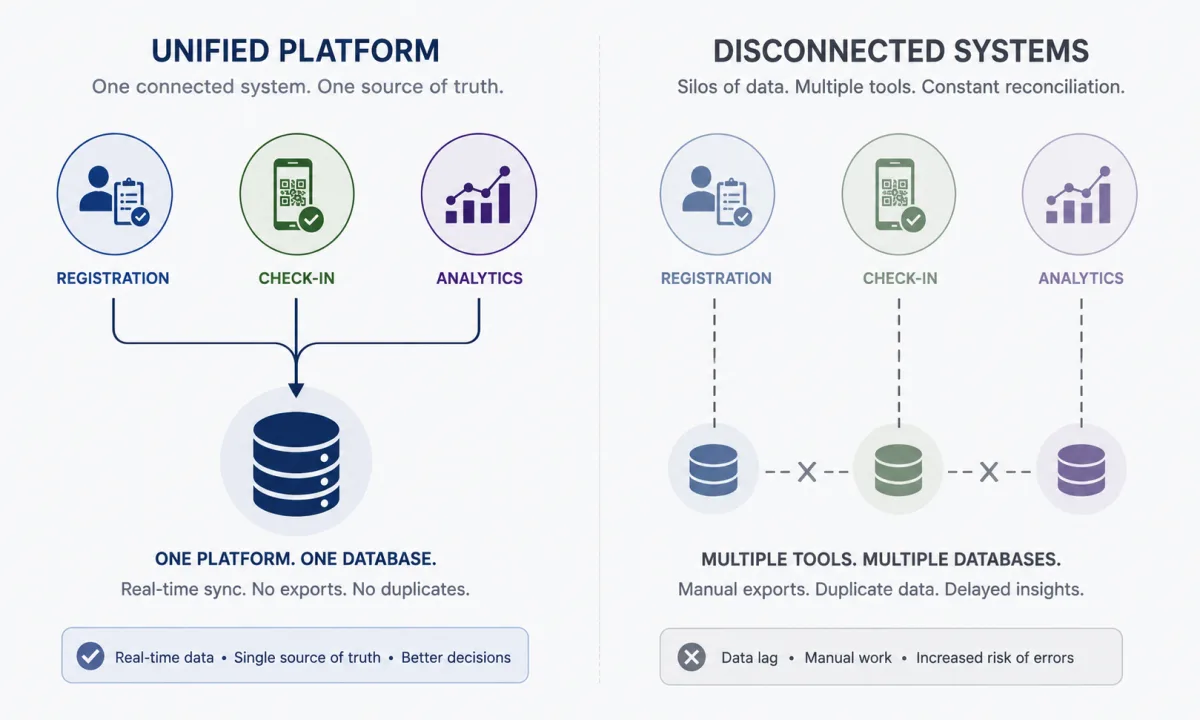
A genuinely unified platform has three specific properties:
- One attendee record. A person who registers, gets scanned at check-in, and shows up in a report is the same database row the entire way through. There is no separate check-in database that gets matched against a separate registration database by name or email after the fact.
- Real-time propagation. A change in one part of the system (a refund, a badge reprint, a session check-in) is visible everywhere else within seconds, not after a nightly batch job or a manual export.
- No required manual step to keep data consistent. Nobody has to download a CSV from registration and upload it into check-in. Nobody has to reconcile a spreadsheet of scanned badges against the ticketing system after the event to figure out who actually showed up.
Contrast that with what "integrated" often means in practice: two or three separate applications, each with its own database, connected by scheduled syncs, webhooks that occasionally fail silently, or manual export and import. That setup can look unified from the outside (same login, same brand, same sales rep) while behaving like three disconnected tools underneath. The distinction matters because the failure modes of a stitched-together stack show up exactly when an organizer can least afford them: during badge pickup, during a sold-out session, during a board update that needs same-day numbers.
The Three Failure Modes of a Stitched-Together Event Stack
Event teams running separate registration, check-in, and analytics tools tend to hit the same three problems, regardless of which specific vendors are involved.

Registration data doesn't reach check-in in real time. Someone registers online the morning of the event, or updates their ticket type, or adds a plus-one, and the check-in team is still working off a list that was exported the night before. The attendee shows up, isn't in the system, and now a staff member is manually searching, calling the registration desk, or improvising a paper workaround while a line builds behind them.
Check-in data doesn't automatically feed analytics. Attendance numbers, session scan counts, and badge reprints sit inside the check-in tool until someone exports them, often after the event rather than during it. That means organizers making staffing or room-capacity decisions on day one of a multi-day conference are working from yesterday's numbers, or no numbers at all.
Manual CSV exports and imports become a full-time job. Someone on the team, often the person with the least time to spare during event week, is responsible for pulling files out of one system and pushing them into another. Every export is a snapshot the moment it's taken, which means it's already stale by the time it lands anywhere. Multiply that across registration, check-in, exhibitor lead scans, and post-event surveys, and reconciliation becomes its own project.
Each of these failure modes traces back to the same root cause: the systems don't share a data model. They share a login page and a support contract, but not a single source of truth.
Why Registration Data Has to Reach Check-In in Real Time
Registration doesn't stop the moment someone completes checkout. Attendees keep changing things right up until (and sometimes during) the event: they upgrade a ticket tier, add a workshop, correct a misspelled name, transfer a registration to a colleague, or request a refund. A conference selling several hundred tickets will see a meaningful number of these changes in the final 48 hours before doors open, which is exactly when check-in staff most need accurate data.

If registration and check-in are separate systems connected by a scheduled sync or a manual export, every one of those last-minute changes is a small chance for the front desk to be working from outdated information. The practical result is a duplicate badge printed for someone who transferred their ticket, a VIP upgrade that doesn't show up at the door, or a refunded attendee who still gets scanned in and counted.
When registration and check-in share the same underlying attendee record, none of this requires a sync at all, because there's nothing to synchronize. The change is the record. A ticket transfer processed at 8:47 a.m. is visible to the person scanning badges at 8:48 a.m. Walk-up registration works the same way in reverse: someone who registers and pays at the check-in desk becomes immediately available for badge printing and session access, without waiting for a batch process to catch up. That single detail, whether registration and check-in read from the same data or two different copies of it, is often the clearest signal of whether a check-in app is actually connected to registration or just sitting next to it.
Why Check-In Data Has to Feed Analytics Automatically
Attendance is one of the most operationally useful numbers an event team has, but only if it's current. Knowing how many people checked in by 9 a.m., how a specific session is filling up, or how many badges were printed at a given entrance is only valuable while the event is still happening. A number that arrives the next morning is a historical curiosity, not a decision-making tool.
When check-in and analytics are separate systems, attendance data typically has to be exported from check-in and loaded into a reporting tool, either manually or on a scheduled interval. That introduces lag exactly where lag is most expensive: an organizer trying to decide whether to open an overflow room needs to know session attendance now, not after the next sync window. A sponsor asking how their booth traffic compares to the same time yesterday needs a live number, not a promise that the report will be ready after the show.
A unified platform treats check-in activity as a live input to analytics rather than a separate export. A scan at the door is simultaneously an admission decision and a data point that updates attendance dashboards, session capacity tracking, and no-show calculations. That also means the analytics an organizer sees during the event and the reconciled numbers they present to stakeholders afterward come from the same source, rather than two datasets that were captured differently and now disagree with each other by a few dozen attendees, which is a surprisingly common and entirely avoidable problem. For a closer look at how different check-in methods affect the accuracy of that attendance data in the first place, see our comparison of attendance tracking methods.
The Hidden Cost of Manual Reconciliation
The direct cost of a fragmented stack is staff time. Somebody has to export registration data, format it for the check-in tool, upload it, verify it imported correctly, and repeat that process every time something changes. On a multi-day event, that can mean doing it more than once a day, on top of every other event-week responsibility.
The less obvious cost is data quality. Every manual export and import is an opportunity for a duplicate record, a mismatched name, a dropped custom field, or a formatting error that silently breaks a lookup. Attendee records drift apart across systems: the registration system has one spelling of a name, the check-in system has another, and the analytics tool has whatever was true at the moment of the last export. None of these are catastrophic individually, but they compound into a badge that prints incorrectly, an attendance report that doesn't match the ticketing report, or a sponsor scorecard built on incomplete scan data.
There's also a trust cost. When an executive asks "how many people are actually here right now" and the honest answer is "we'll know once someone pulls the export," the event team looks less capable than the work they've actually done deserves. Manual reconciliation doesn't just cost hours, it costs confidence in the numbers, and event teams that can't answer real-time operational questions during the event lose credibility exactly when they need it to justify next year's budget.
Event Check-In
Check-in, badges and attendance in one system
Scan attendees in, print badges on the spot and keep attendance synced with registration, so lines move and the counts are right.
Duplicate and Inconsistent Attendee Records
Every export and import between systems is also a chance for one attendee to become two, or three, slightly different records. Someone registers as "Bob Smith," their badge gets printed as "Robert Smith" because a field mapped incorrectly during the last sync, and the post-event survey system has them listed under the email they used to sign up for the newsletter years ago. None of these are dramatic errors on their own, but they add up across a few hundred or a few thousand attendees into a dataset nobody fully trusts.
This shows up in specific, avoidable ways. A duplicate registration record can mean two badges printed for one person, or a scan that reads as "already checked in" for someone who registered twice under slightly different information. A custom registration field, like dietary restrictions, accessibility needs, or a sponsor's booth staff designation, can fail to carry over when it isn't part of the standard export template, which means the people who need that information at check-in or on-site simply don't have it. A refund processed in the registration system that never reaches check-in means a canceled attendee still shows up as admitted in the attendance count.
The deeper issue is that these inconsistencies compound instead of canceling out. A registration system that's 98% accurate, feeding a check-in system that's 98% accurate, feeding an analytics system that's 98% accurate, doesn't produce a dataset that's 98% accurate end to end. Each handoff introduces its own error rate, and by the time attendee data has passed through three systems and two manual exports, the numbers an organizer is presenting to a sponsor or an executive team may be meaningfully off, without anyone being able to say exactly where the discrepancy came from.
A single attendee record eliminates the handoffs where these errors get introduced. There's one name, one email, one set of custom field answers, and every part of the platform reads from that same record rather than a copy of it. That doesn't just reduce errors, it makes errors traceable: if something is wrong, there's one place to fix it, and the fix is immediately correct everywhere else.
"All-in-One" Marketing vs. Genuinely Unified Architecture
Most event technology vendors, including well-known names like Accelevents, Swoogo, and Bizzabo, market themselves as all-in-one platforms that bring registration, onsite tools, and reporting together in a single product. That positioning reflects real demand: organizers are tired of stitching systems together, and vendors have responded by bundling more capability into one login and one contract.
Bundling is not the same as unifying. A platform can sell registration, check-in, and analytics as three modules under one brand while those modules were built at different times, by different teams, on different underlying data structures, and later connected through internal APIs or scheduled syncs. From an organizer's seat, the visible symptoms of that architecture are the same ones a genuinely fragmented multi-vendor stack produces: a delay between when someone checks in and when the number shows up in a report, an export step required to move data between modules, or attendee records that need to be searched for separately in different parts of the product.
This isn't a reason to distrust every all-in-one claim, but it is a reason to verify one before signing a contract. "All-in-one" describes what's bundled into the sales package. "Unified" describes how the data actually moves underneath it. The two claims sound similar and are frequently conflated in vendor marketing, but only one of them determines whether your check-in desk will have accurate data on day one of your event.
Questions to Ask a Vendor Before You Believe "Unified"
The fastest way to tell the difference between a bundled product and a genuinely unified one is to ask specific, technical questions during a demo rather than accepting "yes, it's all connected" as an answer.
- Does a check-in scan update analytics dashboards immediately, or on a delay? Ask the vendor to scan a test badge live during the demo and show you the attendance number changing in real time, not refresh a report five minutes later.
- Does a registration change (refund, ticket transfer, name correction) show up at check-in without anyone exporting or re-syncing anything? Ask them to make the change live and show you the check-in screen updating on its own.
- Is there a single attendee record, or separate ones per module? Ask directly whether registration, check-in, and analytics query the same underlying table or three different ones connected by a sync job.
- What happens if the sync fails? If the honest answer involves a sync at all, ask what the failure mode looks like and how staff would know it happened.
- Can you search for one attendee and see their full history, registration, check-in status, badge reprints, session scans, in one place? If that requires looking in more than one screen or system, the data isn't unified even if the login is.
- Is there any step in your event lifecycle that currently requires a CSV export and import between parts of the platform? If the vendor says no for registration-to-check-in but yes for check-in-to-analytics (or vice versa), that's a partial answer worth pressing on.
None of these questions require technical expertise to ask or to evaluate the answer. A vendor with a genuinely unified architecture can demonstrate real-time propagation live, in the room, in under a minute. A vendor that needs to explain a sync schedule, a nightly batch process, or "we're working on making that faster" is telling you, politely, that the platform is bundled rather than unified.
What a Unified Stack Looks Like on Show Day
The clearest way to see the difference is to walk through a single attendee's path through both kinds of stack.
In a fragmented setup: an attendee upgrades their ticket online an hour before doors open. The registration system records it. The check-in team is working from a list exported that morning, so the upgrade isn't visible. The attendee arrives, the badge printer produces the wrong credential, and a staff member has to manually look up the order, confirm the upgrade by phone or email with the registration desk, and correct the badge by hand. Multiply that by the number of last-minute changes any mid-size conference sees, and the check-in desk spends a meaningful share of peak arrival time on exceptions instead of processing the line.
In a unified setup: the same upgrade is written to the attendee's single record the moment it's confirmed. The check-in team, still working off the live system rather than a static export, sees the correct ticket tier and access permissions the instant the attendee's badge is scanned. No phone call, no manual lookup, no reprint request. At the same time, that scan updates attendance and revenue-by-tier numbers on the analytics dashboard the organizer is watching from the operations desk, so if upgrades are trending higher than expected, that's visible during the event rather than in a report compiled a week later.
The difference isn't a matter of degree, it's structural. One version of this story requires humans to notice and fix a gap between systems. The other has no gap to notice, because there was only ever one record.
The same pattern repeats on a multi-day trade show. In a fragmented stack, exhibitor lead scans, session attendance, and registration revenue typically live in three different tools, and someone has to consolidate them into a single sponsor or executive report, usually overnight or after the show closes. Sponsors asking about day-one booth traffic on day two often get a rough estimate rather than a real number, because the actual figure is still sitting in an unexported log somewhere.
In a unified stack, exhibitor lead scans, session check-ins, and registration data are already in the same reporting layer as they happen. An organizer can pull up day-one booth traffic for a sponsor on the morning of day two because the number was current the moment the last scan happened the day before. That's not a faster version of the same report, it's the difference between a report that has to be assembled and one that already exists, which also makes the post-event work of measuring event ROI far less of a reconciliation project.
Running a Unified Platform with VenueSight
VenueSight was built so that registration, check-in, and analytics operate on the same attendee record rather than as connected-but-separate modules. When someone registers, whether through a custom form with ticket tiers, add-ons, and group checkout, or as a walk-up at the check-in desk, that record is immediately available across the platform. There's no export step between registration and check-in: orders placed online are available to scan the moment they're confirmed, and walk-up registrations processed at the desk can be badged and admitted from the same workflow, without a separate sync.
Check-in activity feeds back the same way. Every scan (admitted, duplicate, blocked, or requiring review) updates real-time attendance reporting through the event check-in app, so organizers can see arrival patterns, session throughput, and who is actually on site while the event is still running, not after someone exports a check-in log. That same data powers session capacity enforcement and access control, so a ticket upgrade or session permission change made at registration is respected at the door without anyone re-syncing anything.
On the analytics side, that means registration and revenue data, live attendance, exhibitor lead scans, and sponsor engagement all live in one reporting layer instead of requiring an organizer to reconcile numbers pulled from three different tools. Reports can be exported to finance, CRM, or marketing systems when needed, but exporting is an output for sharing with other teams, not a required step to keep VenueSight's own modules in agreement with each other.
If you're evaluating whether your current stack, or a platform you're considering, is genuinely unified or just bundled, the questions in this guide are worth bringing to any vendor demo, including ours. You can see how registration, check-in, and analytics work together on a live setup by visiting the event registration solutions page or booking a walkthrough of your own event's registration, check-in, and reporting flow with the VenueSight team.
Frequently Asked Questions
-
VenueSight is built as one platform for registration, check-in, and analytics. The same system that sells tickets also runs check-in and produces real-time analytics, with no manual exports or reconciliation between separate tools.