
Conference Session Scheduling Best Practices: How to Build an Agenda That Works
Build a conference agenda that prevents session conflicts, respects speaker constraints, and keeps attendees engaged with scheduling and capacity rules.
July 23, 2026
A conference schedule is not just a list of sessions assigned to time slots. It's a narrative that either flows or jars, that either keeps attendees engaged or sends them to the hallway to check email.
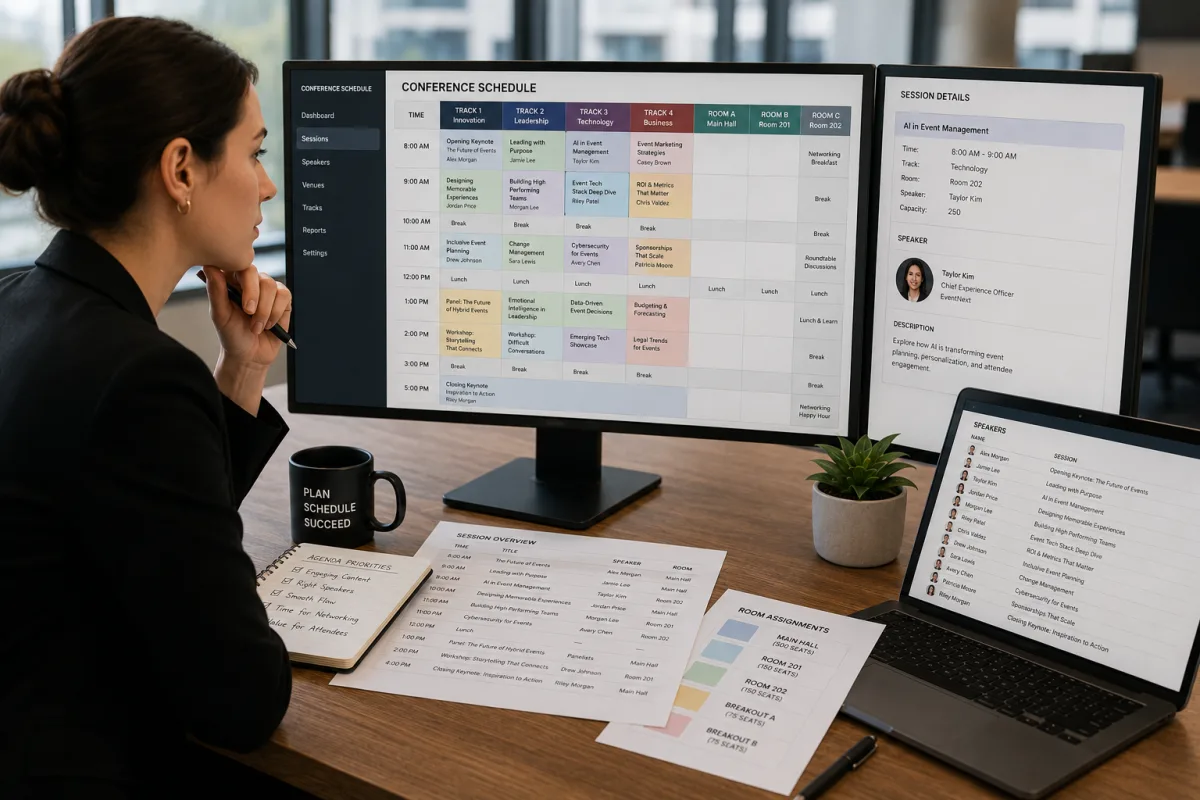
The difference between a schedule that runs smoothly and one that creates bottlenecks, conflicts, and frustrated speakers comes down to a few core principles and the discipline to enforce them before you publish.
This guide covers how to build a conference agenda that works for everyone: attendees find sessions they care about, speakers have what they need to succeed, and the day-of experience feels coherent rather than chaotic.
The Difference Between a Schedule and an Agenda
A schedule is a grid of times and locations. An agenda is a narrative arc.
A schedule answers "When does the session run?" An agenda answers "Why should I go to this session instead of the other one running at the same time, and what will I leave knowing that I didn't before?"
Most conferences publish a schedule. Good conferences publish an agenda.
The distinction matters because it changes how you approach scheduling. Instead of trying to fit sessions into available time slots, you're designing an experience. You're asking: How does this session build on the previous one? How does the difficulty level progress? How does the tone shift to keep attention?
Core Scheduling Principles
Principle 1: Single Track Early, Multi-Track Later
Many large conferences start with a full-day single track (keynote + a few sessions for everyone) on day one, then split into tracks on days two and three. This works because:
- Everyone shares a common experience the first day
- Attendees have time to get oriented before choosing between tracks
- Networking happens with the full audience, not fractured across rooms
- New attendees don't feel lost navigating a complex schedule on day one
The inverse (opening with four parallel tracks) fragments your audience immediately and makes new attendees feel like outsiders trying to catch up.
Principle 2: Keynotes Define the Day
A keynote isn't just an opening speaker. It's a north star that frames what the day is about.
If your keynote is "The Future of Virtual Events", then the sessions that follow should address specific aspects of that topic. If your keynote is "How to Measure Event ROI", then the subsequent sessions should show practical examples of ROI measurement.
A keynote that's tangential to the day's sessions creates cognitive dissonance. It signals that the day doesn't have a coherent theme.
Principle 3: Respect Speaker Availability
Don't schedule a speaker at 8 AM if they told you they couldn't arrive until 10 AM. Don't schedule a speaker in a high-traffic, low-attention slot if they're flying in from across the country. Respect the constraints speakers give you, and you reduce cancellations and poor performance.
Principle 4: Build Session Variety Into the Flow
If you have three sessions in a row on "Registration Technology," attendees tune out. If you have a 75-minute session followed by a 45-minute session followed by a 75-minute session, the rhythm is uneven.
Alternate:
- Session length (mix 45-minute and 75-minute slots)
- Session type (keynote, panel, hands-on workshop, case study)
- Audience level (beginner, intermediate, advanced)
- Delivery style (lecture, Q&A, audience participation, demo)
This variety keeps attendees engaged across the full day.
Principle 5: Energy Management Across the Day
Attendees have limited attention spans. Energy dips at predictable times:
- Post-keynote (11 AM): High energy from keynote, but attention starts dropping
- Post-lunch (1-3 PM): The afternoon slump is real; this is when you run your most engaging speakers or hands-on sessions
- Late afternoon (4-5 PM): Final push; good for actionable takeaways or networking
- Post-happy hour (evening sessions): Energy recovered if the break was good; engagement recovers
Schedule your strongest speakers and most engaging sessions in the afternoon slump (1-3 PM). Schedule foundational or less critical content in the 11 AM slots when engagement is naturally high but attention is starting to drift.
Avoiding Attendee Session Conflicts
The most common scheduling mistake is creating phantom conflicts: sessions that appeal to the same audience but run at overlapping times.
For example:
- "Registration Technology" at 2 PM
- "How to Reduce Registration Drop-Off" at 2 PM (in a different room)
An attendee interested in registration best practices has to choose. You've just created friction and guaranteed that half your audience misses half the content they came for.
Use Tracks to Segment, Not Splinter
If you're building a multi-track conference, define each track's audience explicitly:
- Track A: Registration & Ticketing - For operations professionals
- Track B: Exhibitor Management - For sales and floor planning professionals
- Track C: Analytics & ROI - For executives and data-driven planners
Then schedule sessions so each track has a coherent narrative, and attendees can follow one track without missing critical content in another.
Create a "Don't Run Concurrently" Matrix
Document which sessions should not run at the same time. Use this to guide your scheduling:

How to Manage Conference Speakers (Session 101) — Don't run concurrently with:
- Speaker panel discussion (Session 205)
- AV and Tech Requirements (Session 203)
Registration Drop-Off Workshop (Session 102) — Don't run concurrently with:
- Registration Platform Comparison (Session 206)
- Pricing Strategy Session (Session 301)
This matrix prevents you from accidentally creating conflicts as you move sessions around.
Room Capacity Planning and Track Sizing
The gap between a well-attended session and an overcrowded one is 10 minutes.
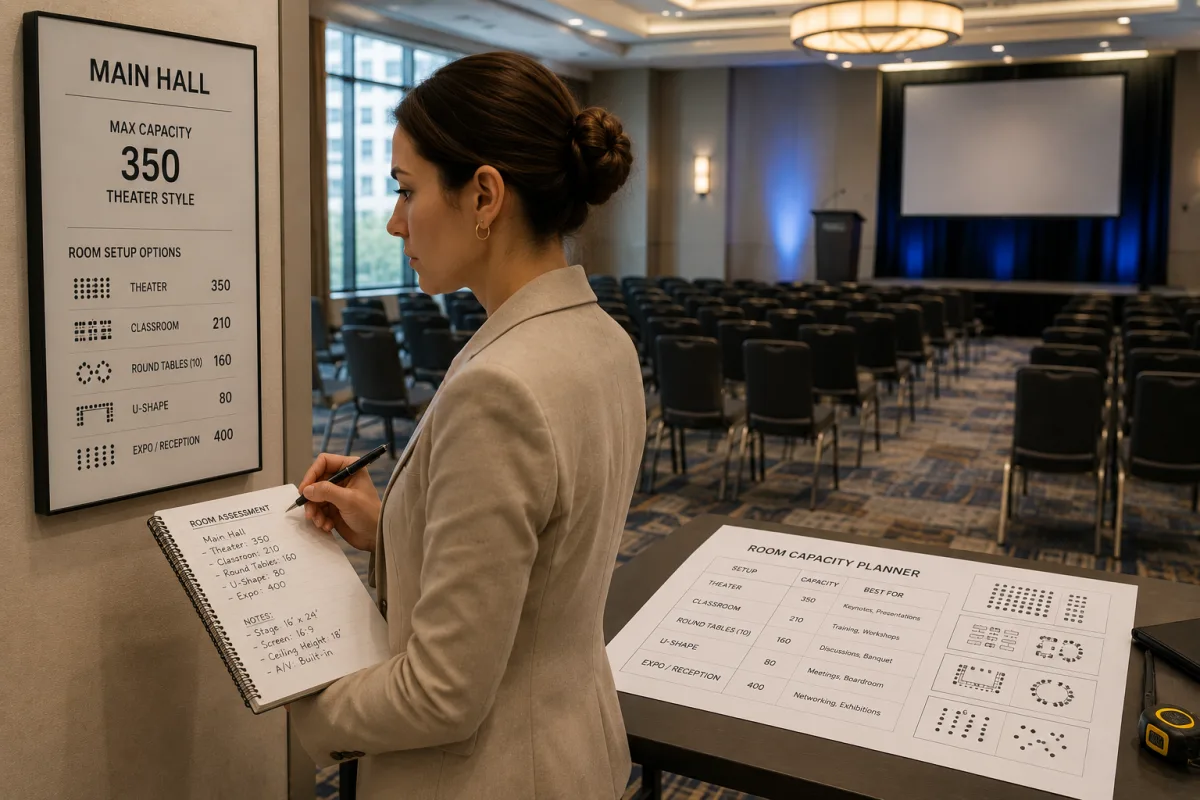
Before you finalize room assignments, audit capacity:
Map Expected Attendance per Session
Don't assume all sessions are equally popular. Some sessions will draw 80% of your attendees; others will draw 20%.
Estimate based on:
- Speaker popularity or brand recognition
- Topic appeal (broad vs. niche)
- Attendee role level (executive sessions tend to draw smaller crowds)
- Time slot (post-lunch slots draw larger crowds than early morning)
Size Rooms Based on Demand, Not Just Capacity
A 500-person keynote in a 1,000-seat ballroom feels empty. A 200-person breakout in a 150-seat classroom is overcrowded.
If you know a session will draw 200 people, book a 225-person room (90% capacity). If you know a session will draw 50 people, book a 75-person room. A room that's 85-90% full feels full; one that's 60% full feels empty.
Build Overflow or Spill
If your most popular sessions are likely to exceed room capacity, have a backup plan:
- Book a larger room than you think you'll need for the most-anticipated sessions
- Set up overflow viewing in an adjacent space with video feed
- Be prepared to move sessions to larger rooms up until 24 hours before the event
You're better off moving a session to a larger room than turning people away at the door.
Keynote Placement and Strategy
Keynotes aren't sessions; they're moments. They break the flow and reset attention. Use them strategically.
Opening Keynote
Your opening keynote sets the tone for the entire conference. It should:
- Be delivered by your most compelling speaker (not necessarily the most famous, but the most engaging)
- Address a broad topic relevant to all attendees (not a niche subtopic)
- Provide perspective rather than tactical how-to (that's for the breakout sessions)
- End with a clear framing of what the day or conference is about
A great opening keynote answers: "Why did you come here, and what are you about to learn?"
Closing Keynote
Your closing keynote should feel like a capstone, not a bonus. It should:
- Synthesize themes from the day or conference
- Provide perspective on where the field is headed
- End with a call to action (not a sales pitch, but something attendees should think about or do)
- Be delivered by someone with authority or credibility on the subject
A great closing keynote answers: "What should I do with what I just learned?"
Mid-Conference Keynotes
If your conference runs multiple days, a mid-conference keynote (morning of day two) can reset attention and shift the focus. Use it to:
- Pivot to a new theme or topic area
- Bring in an external perspective or guest speaker
- Build momentum heading into the second half
Avoid Overusing Keynotes
If you have a keynote every hour, they lose their impact. Reserve keynotes for moments where you're genuinely changing the narrative. Two or three keynotes per day is typical; more is too many.
Session Management
Keep a multi-track agenda organized
Manage sessions, rooms, speakers and capacities in one place, and push schedule changes to attendees in real time.
Managing Parallel Tracks
Running parallel tracks allows you to serve multiple audiences simultaneously. It also creates complexity.
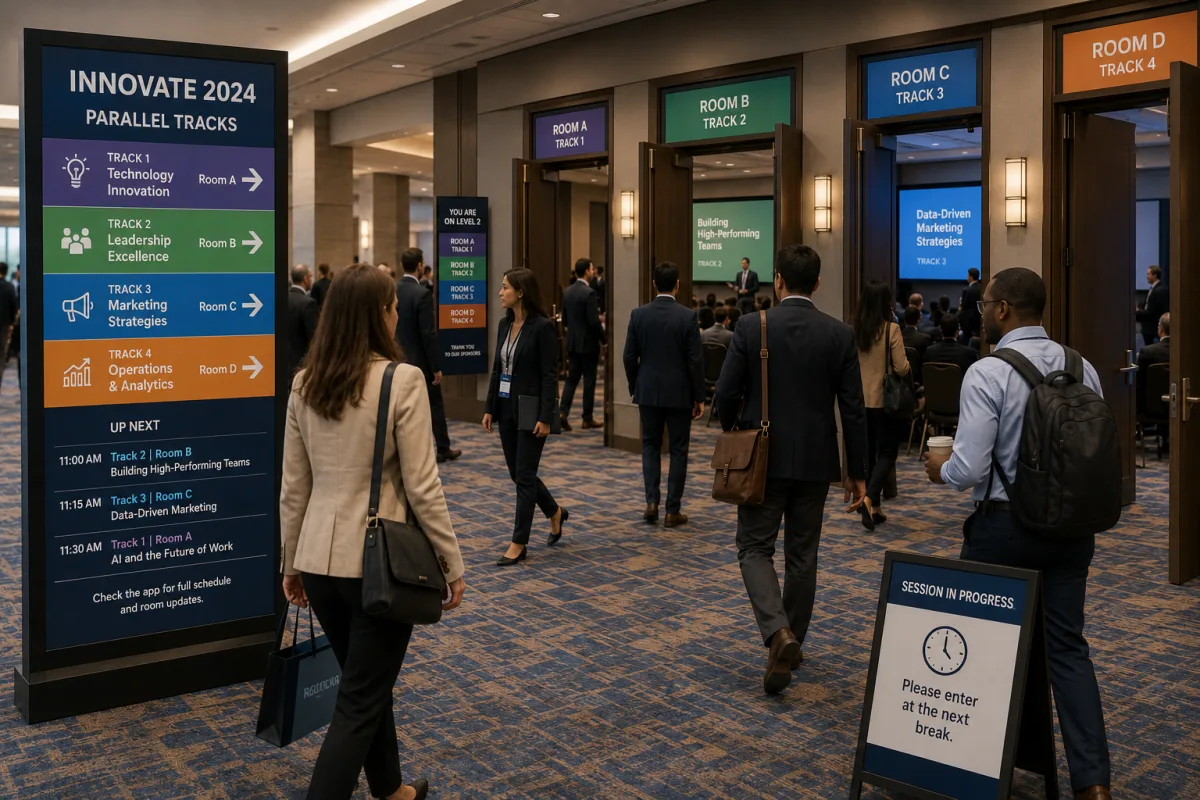
Rule: All Parallel Tracks Start and End Together
If Track A sessions run 2:00-2:45 and Track B sessions run 2:00-3:00, you've created a mismatch. Attendees trying to move from Track B to Track A at 2:45 arrive midway through a Track A session.
Enforce uniform start and end times across all tracks. If one track needs longer sessions, build that into its design for all sessions, not just some.
Rule: Allow 10-15 Minutes Between Session Blocks
After a session ends, attendees need time to leave the room, walk to the next session, get coffee, or use the restroom. If sessions end at 2:45 and the next block starts at 2:50, you're guaranteeing that 20% of attendees will be late.
Build 10-15 minutes between session blocks. Sessions that require setup (hands-on workshops) need 20-30 minutes.
Rule: Stagger Track Timing to Prevent Hallway Congestion
If all attendees exit their session at 2:45 and need to find a new room by 3:00, your hallways become bottlenecks.
Offset track timing by 10-15 minutes:
- Track A: 2:00-2:45
- Track B: 2:15-3:00
- Track C: 2:30-3:15
This spreads hallway traffic and prevents the 2:45 crunch. (Your opening keynote still runs all attendees together; this staggering applies only to breakout sessions.)
Buffer Time and Transition Logistics
Buffer time is the unsexy part of scheduling that separates professional conferences from chaotic ones.
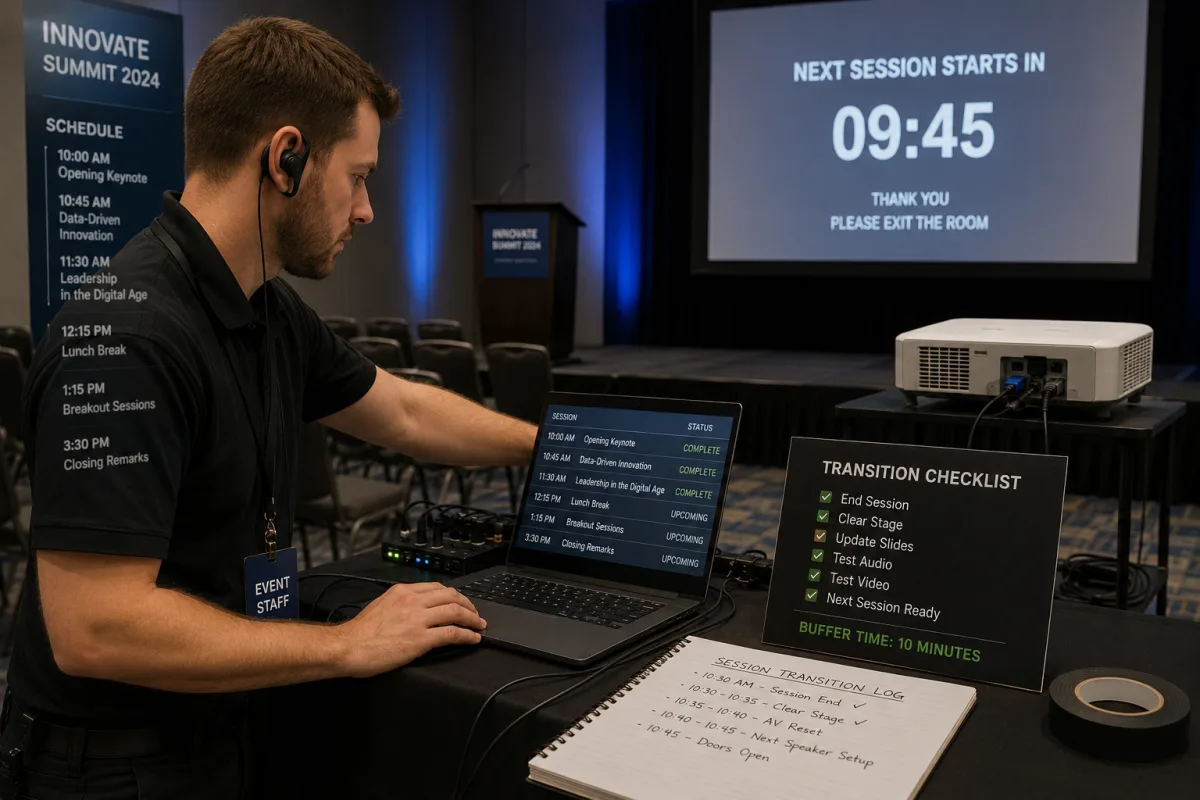
Account for Setup and Teardown
If a session involves:
- Live demo or technology
- Audio/video playback
- Audience participation or small group activity
- Hands-on workshop
Add 10-15 minutes before the session starts for setup and 5-10 minutes after for teardown. These aren't "wasted" time; they're insurance against running behind.
Build in Breaks at Scale
The larger your conference, the longer bathroom and coffee lines get. For a 50-person event, a 10-minute break is fine. For a 500-person event, you need 20-30 minutes to allow everyone to reset.
A 10:45 AM break that's too short means people are still in the bathroom when the 11:00 AM session starts. A 10:45-11:15 AM break that's generous prevents this.
Account for AV Transitions
If you're using the same room for back-to-back sessions with different speakers:
- Session A ends at 2:45 PM
- 2 minutes: Session A cleanup (AV shut down, speaker thanks)
- 10 minutes: Session B setup (AV test, speaker briefing, audio levels)
- 3 minutes: Audience filter in
- 2:58 PM: Session B ready to start
If you don't build this in, Session B starts 10 minutes late, which cascades into the rest of the schedule.
Scheduling Software and Tools
Manual scheduling (spreadsheets, shared docs, email discussions) works for events under 30 sessions. Beyond that, you need a tool.
What to Look For in Scheduling Software
- Conflict detection: The tool flags sessions that appeal to the same audience running at the same time
- Capacity planning: Shows you room utilization so you can see if a session is over- or under-booked
- Speaker constraints: Allows you to mark speaker availability and prevents double-booking
- Attendee-facing program: Automatically publishes the schedule to your event website so attendees can plan their day
- Changes and updates: When you move a session, automatic updates to attendees via email or app
Spreadsheet Limitations
Spreadsheets are error-prone because:
- You have to manually check for conflicts (and you'll miss some)
- Room capacity is invisible until you're looking for it
- Updates to the spreadsheet don't automatically notify attendees
- Print-proofing is tedious and prone to typos
If you're using a spreadsheet, you're managing risk manually. That works until it doesn't.
Allowing Attendee-Driven Session Selection
The best agendas give attendees agency. The worst feel pre-determined.
Publish Sessions Early
Make the full session lineup (with abstracts) available 4-6 weeks before the event. This gives attendees time to think about which sessions they want to attend and build their personal agenda.
Attendees who can't see the lineup ahead of time show up unprepared and make split-second decisions. This increases last-minute crowding and session-hopping.
Build Personal Agendas
Your event website should allow attendees to star or bookmark sessions they're interested in. This creates a "My Schedule" view that shows them:
- Their full day across all three days
- Conflicts where they've starred two sessions at the same time (so they have to choose)
- Time to grab lunch or coffee between sessions
Provide Recommendations, Not Mandates
Some conferences pre-assign sessions to attendees based on role (all "Executives" go to the C-Suite track, etc.). This is patronizing. Instead, make recommendations:
- "Based on your interest in registration platforms, you might like these sessions…"
- "Other attendees with your role typically attend these sessions…"
Recommendations are helpful. Pre-assignments feel limiting.
Post-Event Feedback and Iteration
A great schedule isn't built in isolation. It's informed by data from previous events.
Survey Attendees on Session Satisfaction
After the conference, ask:
- "Which sessions did you attend?"
- "How satisfied were you with each session?" (1-5 scale)
- "What time slots worked best for you?"
- "Were there sessions you wanted to attend but couldn't due to conflicts?"
This data tells you:
- Which sessions resonated (and which didn't)
- Whether speakers delivered on their abstracts
- Where attendee conflicts happened and how severe they were
- Optimal timing and pacing
Track No-Show Rates
A high no-show rate for a particular session suggests:
- The session description didn't match what attendees expected
- The time slot was poor (right after lunch, too early, too late)
- The speaker's delivery didn't match their reputation
- There was a conflicting session attendees preferred
No-show data tells you which sessions to reconsider or reschedule next year.
Document Scheduling Decisions for Next Year
Create a simple note: "Session X (300 people) was overcrowded; book a larger room next year" or "Track A and Track B both drew registration professionals; consider consolidating". These notes are gold when you're building next year's schedule.
Running Session Scheduling with VenueSight
Scheduling becomes dramatically simpler when you have a single source of truth for speakers, sessions, rooms, and attendance.
VenueSight's conference session management feature provides:
Centralized Agenda Building: Define all your sessions in one place: topic, description, speaker, time slot, room, and capacity. Attendees see this information in your event website immediately.
Conflict Detection: The system flags when two high-appeal sessions run at the same time so you can address the conflict before publishing.
Capacity Dashboards: See at a glance which sessions are underbooked (under 50% capacity) and which are overcrowded (over 90% capacity). Move sessions to appropriately-sized rooms before attendees arrive.
Speaker Coordination: Speakers see their session details, AV requirements, and run-of-show. They know exactly when they're speaking and what they need to prepare. You avoid the "I didn't know I was on at 2 PM" conversation.
Attendee-Facing Scheduling: Attendees can browse the full program, star sessions they're interested in, and build a personal schedule. They see conflicts immediately (if they've starred two concurrent sessions) and can resolve them before the event.
Automatic Updates: When you change a session time, attendees get notified automatically. No manual email blasts.
Book a demo to see how session management works end-to-end.
Frequently Asked Questions
-
Yes. VenueSight's conference session management feature centralizes session, speaker, and room data in one place, flags scheduling conflicts before you publish, and shows capacity dashboards so sessions can be moved to appropriately sized rooms; attendees see the published schedule and are notified automatically when a session time changes.
-
Yes. In VenueSight, attendees can browse the full program, star sessions they're interested in, and build a personal schedule, and they are notified automatically if a session they have starred changes time or room, instead of finding out onsite.
-
Yes. VenueSight's capacity dashboards show real session attendance against registered counts, so organizers can distinguish sessions that were pre-registered but under-attended from genuinely high-demand sessions when sizing rooms for the next event.